Hubstaff: Time Tracking with Screenshots & GPS for Remote Teams
Fastlancer Team · Updated: Jun 26, 2026
Short verdict
Ideal for
- Remote teams with hourly billing or payroll workflows
- Agencies that need to document work transparently for clients
- Solo freelancers with field work or mobile shifts (GPS tracking)
Not ideal for
- Projects where screenshot monitoring damages the client relationship
- Solo freelancers — paid plans start at two seats
- Entry price
- Free plan · paid from $4 / month
- Free to start?
- Yes — 14-day free trial, no credit card required
- Stands out for
- Time tracking with screenshots, activity levels and integrated payroll in one tool — built for transparent remote collaboration.
Hubstaff is one of the best-known time tracking platforms for remote teams and agencies — and one of the most polarizing. If you need transparent hourly billing with clients, screenshots and activity levels give you a serious documentation tool. If you "just" want to track your own hours, that same monitoring layer can feel like overkill. This review breaks down who Hubstaff actually fits in 2026 — and where Toggl, Clockify or Harvest are the smarter pick.
As of June 2026. We check pricing regularly — confirm current rates on the official Hubstaff pricing page before signing up.
What is Hubstaff?
Hubstaff is a cloud-based time tracking and productivity platform founded in 2012 in Indianapolis. Over 140,000 global users and companies worldwide rely on it for transparent work-hour tracking — primarily remote teams, agencies and solo freelancers with hourly billing.
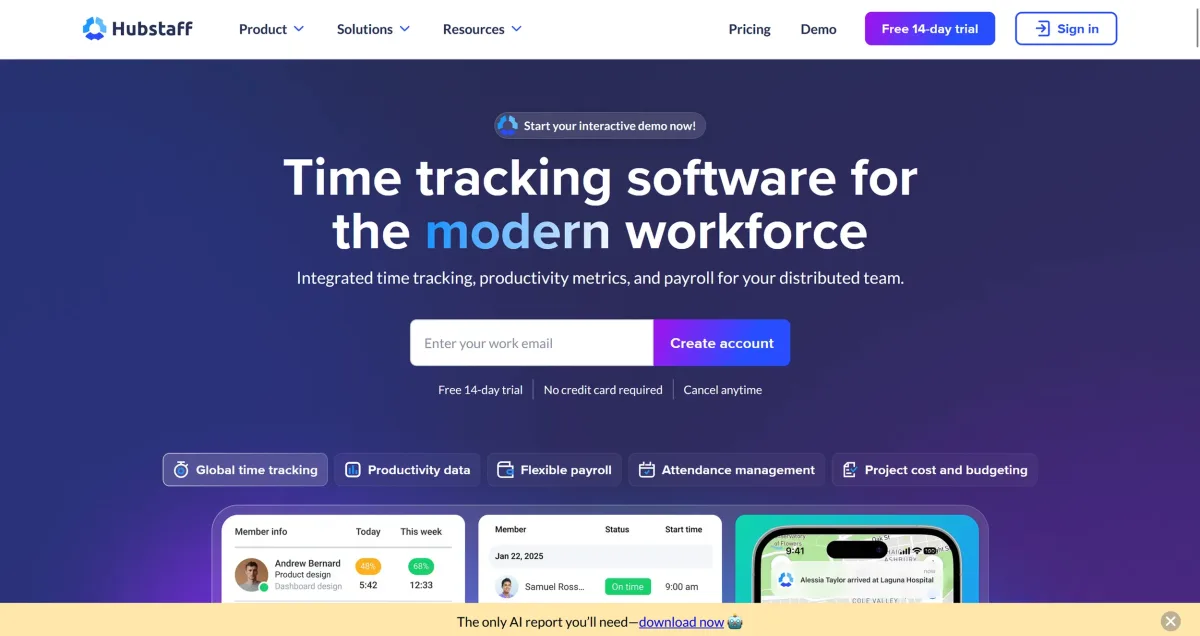
At its core, Hubstaff combines three building blocks: precise time tracking with automatic timesheets, optional monitoring via screenshots and activity levels (keyboard/mouse activity), and workforce management with scheduling, GPS tracking, project budgets and integrated payroll. The software runs cross-platform on Windows, Mac, Linux, iOS and Android, plus a Chrome extension.
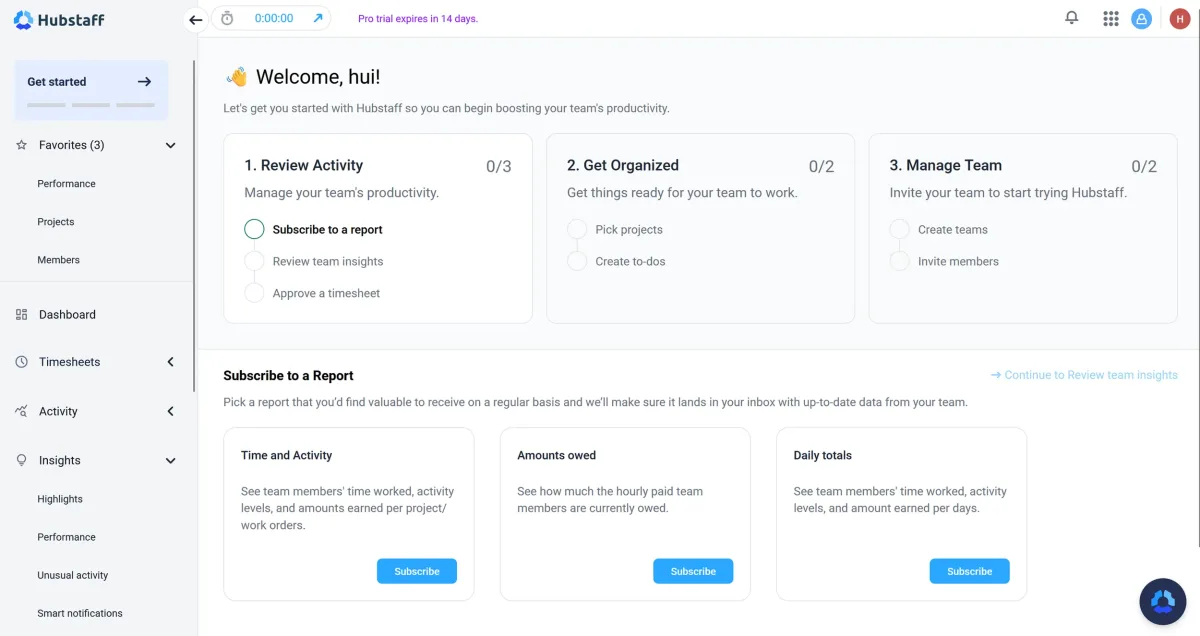
Key Features of Hubstaff
Automatic time tracking: Desktop app, mobile app or Chrome extension starts the timer; manual edits are always allowed.
Screenshot monitoring (optional): Starter plan and above — 500 screenshots per user/month (Grow: 1,500, Team and above: unlimited), random intervals, configurable per user or off entirely.
Activity levels: Keyboard and mouse activity expressed as a percentage — surfaces idle time without content tracking.
App and URL tracking: Shows which apps or websites the tracked time was spent in.
GPS tracking and geofencing: Team plan — automatic clock-in/out when entering defined locations, ideal for field work.
Project budgets and auto-pause: Set per-project time budgets, auto-pause on inactivity.
Integrated payroll and invoicing: Payouts via PayPal, Wise, Payoneer or bank transfer; auto-generated client invoices from tracked time.
30+ integrations: Asana, Trello, ClickUp, Jira, GitHub, Notion, QuickBooks, Xero, Slack, Zapier and REST API.
Video: "Hubstaff: Time Tracking Software & Productivity Insights for Smarter Team Management" — official @Hubstaff YouTube channel. A two-minute overview covering time tracking, productivity reporting and team workflows.
Hubstaff Pricing 2026: What Each Plan Costs
Two things distort every Hubstaff price comparison. First, all paid plans require a minimum of two seats — so the solo price is effectively double. Second, the advertised figures are for annual billing; monthly adds about 30 %.
The ladder itself follows how much proof you need: the free plan suits occasional solo use, the entry tier covers time tracking with activity measurement, the middle one is the standard choice for agencies documenting work for clients, and only the next brings GPS, geofencing, shift scheduling and built-in payroll for teams with field staff. Every paid plan has a 14-day trial without a credit card.
Pros & Cons
Pros
- Time tracking with screenshots and activity levels
- GPS tracking and geofencing for field work
- Integrated payroll via PayPal, Wise, Payoneer
- Cross-platform: Desktop (Win/Mac/Linux), iOS, Android, Chrome extension
Cons
- Invasive screenshot monitoring on sensitive projects
- Free plan: 1 user, 3 clients only
- 2-seat minimum on all paid plans
Who Should Use Hubstaff?
Hubstaff is clearly worth it for three audiences: remote teams with hourly billing that need to show clients exactly what was done and when — screenshots and activity levels become a real trust-builder here. Agencies with distributed staff that want payroll, project budgets and client invoicing in one tool. And solo freelancers with field work or shift-based setups, where GPS tracking and attendance mode solve actual problems.
If you only need solo time tracking with no screenshot requirement, Toggl Track or Clockify is leaner and cheaper — Hubstaff's feature set is overkill and the 2-seat minimum makes the effective price unattractive. On sensitive client projects (legal, therapy, health) the screenshot module should be turned off deliberately, or a non-monitoring tool chosen instead.
Hubstaff vs Alternatives
Toggl Track — the lean, freelancer-friendly choice. No monitoring, polished UI, generous free tier for up to 5 users. Better fit for solo freelancers without screenshot needs.
Clockify — free time tracking for up to 5 users on the free plan, with cheap paid tiers beyond that. Ideal for budget-conscious teams that don't need screenshots.
Harvest — combines time tracking with strong invoicing and project management. Better pick when invoicing is the main use case and monitoring isn't needed.
RescueTime — fully automated productivity tracking for solo users without client-facing features. Complementary to Hubstaff rather than a direct competitor.
Time Doctor — closest head-to-head competitor with a similar screenshot and activity model. Stricter monitoring (website blocking), slightly cheaper on the Team tier.
For the full overview of the top time tracking tools for freelancers in 2026, see our time tracking tool comparison.
Pricing
Free
Free
1 user, max 3 clients, limited data retention
- Time tracking for 1 person
- Max 3 clients, 100 screenshots per month
- Limited data retention
Starter
$4
per seat/month billed annually ($4.99 monthly)
- Unlimited time tracking
- Screenshots (500 per user/month)
- Activity levels (keyboard/mouse)
Grow
$7
per seat/month billed annually ($7.50 monthly)
- Everything in Starter
- 1,500 screenshots per user/month
- App and URL tracking
Team
$10
per seat/month billed annually
- Everything in Grow
- Unlimited screenshots
- GPS tracking and geofencing
Prices may change — check the official website for current plans.
Alternatives by use case
- Toggl Track If tracking should happen without monitoring
- Clockify If a team needs a free starting point
- Clockodo If EU hosting and working-time records are required
- Jibble If only attendance needs recording



Frequently Asked Questions
What is Hubstaff?
Hubstaff is a cloud-based time tracking and productivity platform founded in 2012 and used today by over 140,000 global users and companies. It combines classic time tracking with optional screenshots, activity monitoring, GPS tracking, project budgets and integrated payroll. The platform targets remote teams, agencies and freelancers who bill by the hour.
How much does Hubstaff cost in 2026?
Five plans, priced per seat. Two things distort every comparison: all paid plans require a minimum of two seats, so the solo price is effectively double — and the advertised figures assume annual billing, with monthly adding about 30 %.
Is Hubstaff free?
Yes — the Free plan is permanently free, but tightly capped: 1 user (organization owner), a maximum of 3 clients, 100 screenshots per month and limited data retention. Fine for sporadic solo use — anyone managing more clients, needing more screenshots or a longer data history will need at least the Starter plan.
How does Hubstaff's screenshot monitoring work?
From the Starter plan upward, Hubstaff can take screenshots at random intervals during active time tracking (default: 3 per 10 minutes, adjustable). The plans differ in monthly volume: Starter includes 500 screenshots per user, Grow 1,500, Team and above unlimited — even the Free plan includes 100 per month. Frequency and whether screenshots run at all is configurable per user — you can turn it off entirely. Team members see their own screenshots and can discard them before upload. For sensitive client projects (legal, healthcare, therapy) the feature should be deliberately disabled or a non-monitoring tool chosen instead.
Hubstaff vs Toggl Track — which fits better?
Toggl Track is the lean, freelancer-friendly choice: no monitoring, no mandatory screenshots, polished UI and a generous free tier for up to 5 users. Hubstaff is the right call when you need screenshots, GPS tracking or integrated payroll — typically agencies, remote teams with client-trust requirements, or field-work setups. Solo freelancers without those needs save real money with Toggl. See our Toggl review.
What integrations does Hubstaff offer?
Hubstaff connects with 30+ common project and accounting tools: Asana, Trello, ClickUp, Jira, GitHub, Notion for project management; QuickBooks, Xero, FreshBooks, PayPal, Wise, Payoneer for billing and payroll; Slack, Microsoft Teams for communication. Plus an open REST API and Zapier connector for custom workflows.
Verdict
Hubstaff is one of the most mature time tracking platforms for remote teams and agencies that need to document client work transparently. The combination of time tracking, screenshots, GPS and payroll makes it a sensible choice when you need more than a stopwatch — the built-in PayPal/Wise payouts alone save agencies meaningful admin time. For solo freelancers without team or screenshot needs, Toggl Track or Clockify is leaner and cheaper. The 2-seat minimum on paid plans makes Hubstaff economically unattractive for true solo use.