Asana Review 2026: The Best Project Management Tool for Freelancers?
Fastlancer Team · Updated: Sep 5, 2026
Short verdict
Ideal for
- Freelancers managing multiple client projects in parallel
- Self-employed people who need tasks, deadlines and project progress in one view
- Small teams and freelancer collectives with multiple project contributors
Not ideal for
- Anyone working alone who only needs a task list
- Teams over two people that want to stay free
- Entry price
- Free plan · paid from $13.49 / month
- Free to start?
- Yes — permanently free Personal plan (1–2 users)
- Stands out for
- Structured project management with tasks, subtasks, deadlines and dependencies — far more than a simple to-do list
As a freelancer you're often juggling multiple projects: client work, personal projects, administrative tasks. Without a system you quickly lose track of what's due and what's missing. Asana is one of the most capable tools for this — with a permanently free version that takes solo freelancers surprisingly far.
What stands out in daily use
Asana is often the client-side standard inside agency teams rather than a tool anyone picked. That is one of its strengths: new team members and externals get up to speed quickly.
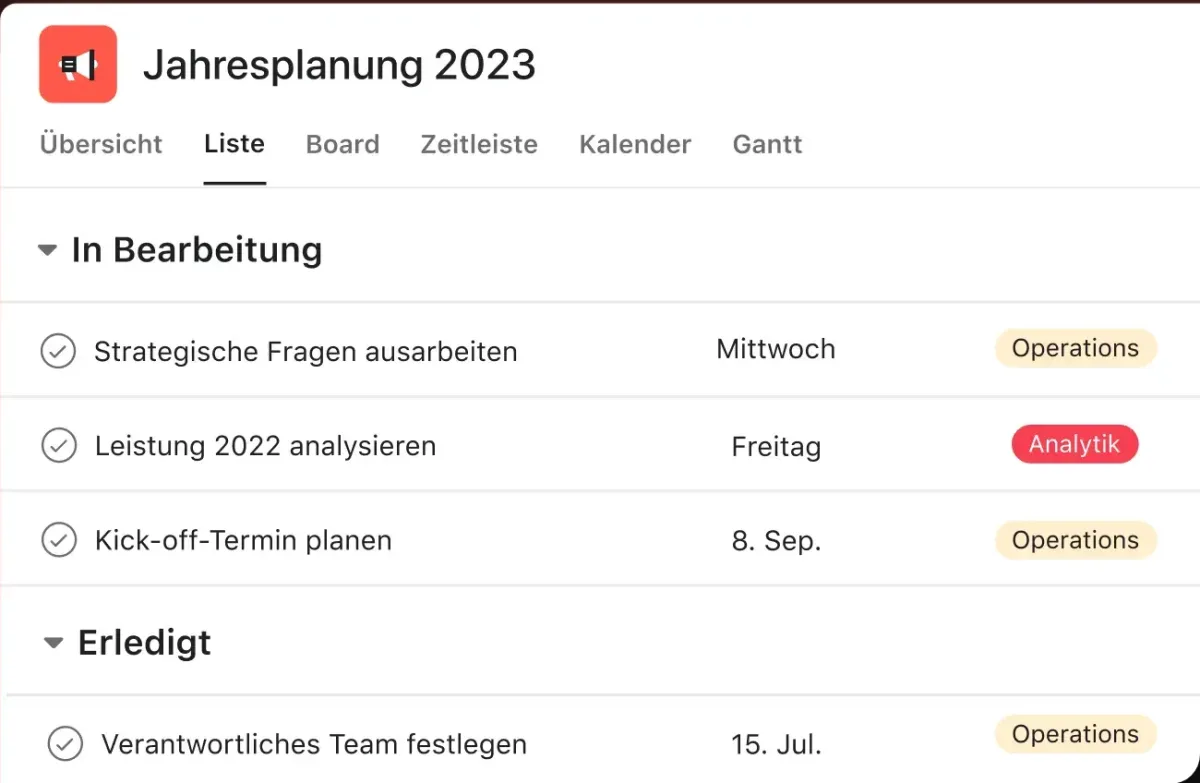
What goes fast: Onboarding is well thought out. The core logic of projects, tasks, subtasks and assignees clicks within minutes, with no training.
Where friction remains: Once tasks get deeply nested — subtasks of subtasks, plus notes, comments and attachments — visibility breaks down. Important information disappears inside subtask detail views.
Asana, Trello or ClickUp: Trello is the simpler pick if a kanban board is enough. ClickUp packs more features into a similar price range but feels less tidy. Asana is more polished and costs more.
What is Asana?
Asana is a web-based project management platform founded in 2008 by Facebook co-founder Dustin Moskovitz. The core concept: break projects into tasks and subtasks, assign deadlines, define dependencies, and track progress across multiple views — from a simple to-do list to a full Gantt chart.
The platform runs in the browser and on iOS and Android, integrating with 100+ tools including Slack, Google Drive, Zoom, GitHub, and Figma. It scales from a simple task list to an enterprise-level project portfolio.
Pros & Cons
Pros
- Clear task structure with dependencies
- Multiple views: list, board, calendar, timeline
- Personal plan permanently free for individuals
- 100+ integrations: Slack, Google Drive, Zoom
- AI features (AI Studio) available from Starter
Cons
- Personal plan limited to 2 users
- Overwhelming for simple to-do needs
- Timeline (Gantt view) only from Starter
Key Features
- Tasks & subtasks: Break work into nested subtasks, assign owners and due dates, and define dependencies between tasks.
- Multiple views: List, board (Kanban), calendar, and timeline/Gantt (from Starter) — pick the right perspective for each project.
- Automations (from Starter): Auto-assign new tasks, change status at deadline, trigger notifications.
- Forms & templates: Capture incoming requests in a structured way and spin up projects from templates (from Starter).
- Reporting: Dashboards showing project progress, open tasks, and upcoming deadlines (from Starter).
- Integrations: Slack, Google Workspace, Microsoft 365, Zoom, GitHub, Figma, and 100+ more.
Why Asana Makes Sense for Freelancers
For freelancers, the most common problem isn't missing skills — it's a missing system. Asana provides fixed structure: each client project gets its own space, tasks have deadlines, and subtasks prevent individual steps from getting lost.
The calendar view in the Personal plan shows all due dates at a glance. Freelancers managing multi-phase projects with clients will benefit from the timeline view in Starter — a full Gantt chart for $10.99 per user/month on the annual plan.
One common criticism: Asana can feel overwhelming for simple needs. Those managing only a handful of daily tasks are often faster with TickTick or Notion. Asana delivers real value when projects grow complex and multiple people are involved.
Pricing
Personal
Free
free forever, up to 2 users
- Unlimited tasks & projects
- List, board and calendar views
- Unlimited file storage (max. 100 MB/file)
Starter
$10.99
per user/month billed annually · $13.49 monthly
- Unlimited team members
- Timeline & Gantt view
- Unlimited automations and rules
Advanced
$24.99
per user/month billed annually · $30.49 monthly
- Everything in Starter
- Unlimited automations, workload and goals
- Portfolios & workload management
Prices may change — check the official website for current plans.
Price history
Checked Sep 25, 2026 · 2 plans unchanged since Sep 14, 2026
Alternatives by use case




Frequently Asked Questions
Is Asana really free?
Yes — the Personal plan is permanently free. It includes unlimited tasks and projects, list and board views, and 100+ integrations. Limit: maximum 2 users. For solo freelancers that's fully sufficient.
What's the difference between Personal and Starter?
Starter ($10.99/user/month, annual) removes the 2-user limit and adds timeline view (Gantt), unlimited automations (rules), dashboards and custom fields. For freelancers managing projects with clients or subcontractors, Starter is the meaningful step up.
Is Asana worth it for freelancers?
For freelancers running multiple parallel projects with clients: yes. Asana helps prioritize tasks, track deadlines and maintain overview. Those managing only a handful of tasks are often better served by TickTick or Notion — Asana delivers its real value when project complexity grows.
Can I use Asana as a solo freelancer?
Yes — the free Personal plan is explicitly designed for individuals. You can create unlimited tasks and projects, set deadlines and manage everything in list, board or calendar view. Starter only becomes relevant when you start collaborating with others.
Verdict
For solo freelancers who want to structure their own projects, the Personal plan is fully sufficient. Anyone regularly collaborating with clients or subcontractors, managing multiple projects simultaneously, or needing automations will work significantly more efficiently with Starter ($10.99/user/month, annual). Timeline view and unlimited team members make the key difference.