absence.io Review 2026: Leave Management and Time Tracking, Tested
Tim Wittke · Updated: Sep 5, 2026
Short verdict
Ideal for
- Small businesses getting leave requests out of Excel and email
- Teams that want time tracking and absences in one tool
- Companies with data-protection requirements: hosting exclusively on German servers
- Growing teams that will add personnel files and expenses later
Not ideal for
- Solo freelancers — there is neither a free nor a single-user plan
- Anyone billing client hours rather than documenting working time
- Teams that need DATEV export without the top plan
- Entry price
- Free plan · paid from €2.99 / month
- Free to start?
- Yes — 14 days free, no credit card
- Stands out for
- Leave management, time tracking and digital personnel files from Munich — hosted exclusively on German servers, from €2.99 per user
What is absence.io?
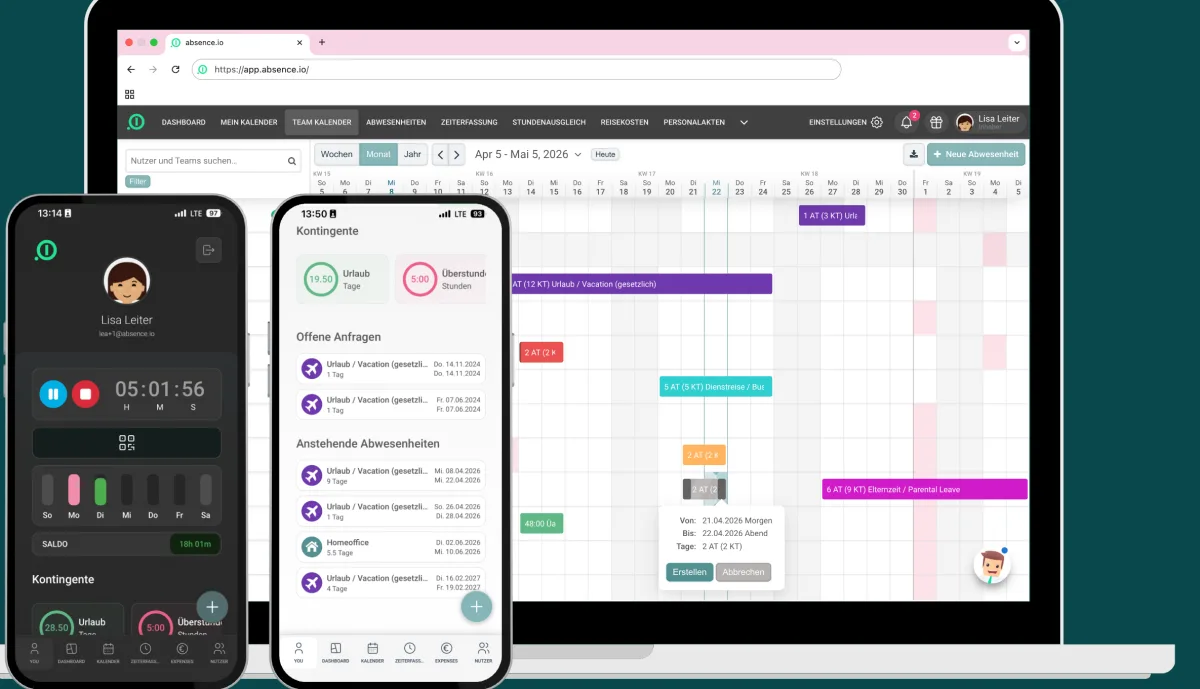
absence.io is a Munich-based HR tool that started with one clear problem: leave requests haunting companies via email and Excel lists. It has grown into a lean HR platform — absence management, time tracking, digital personnel files and expenses, staggered across three packages. On the market for over ten years, built in Munich and Berlin.
For framing: absence.io is team software for HR processes — not a project-hour tracker for solo freelancers. If you bill hours to clients, our time tracking overview has the better-fitting tools.
Leave management: the core
The Starter plan digitises the whole absence workflow: employees request leave via web or app, managers approve with one click, and the team calendar shows who's out when. Leave allowances, carry-over with expiry dates and custom absence types (remote work, training, parental leave) are all covered, along with reminders before remaining leave expires. Slack, Google and Outlook integrations sync everything to where the team already works.
Time tracking and personnel files (Pro)
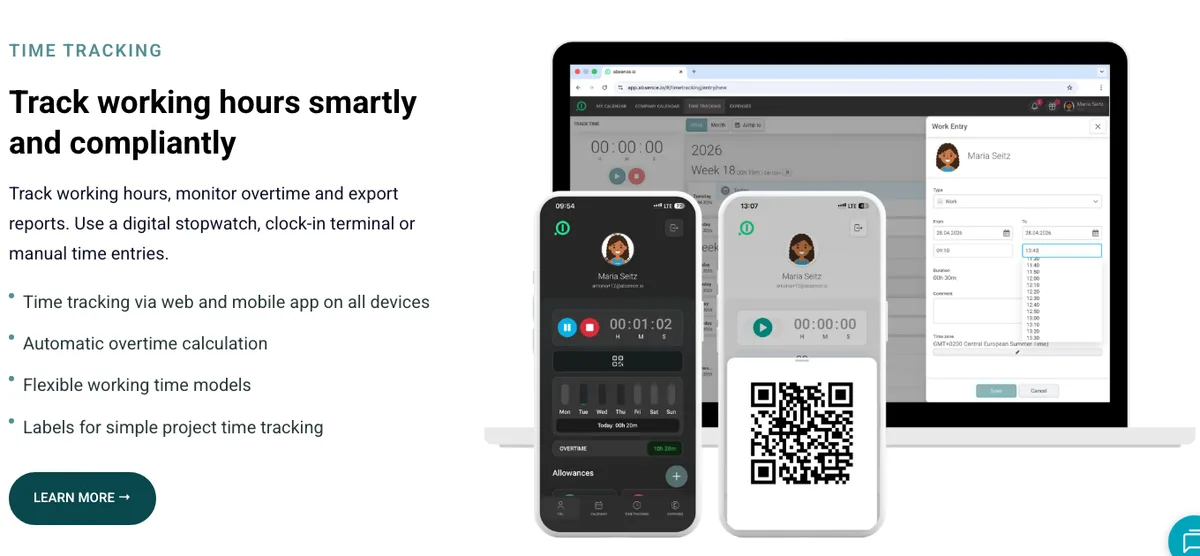
The Pro plan adds time tracking via web, app or digital punch clock — with automatic overtime management and individual work schedules per employee. Digital personnel files, document management and single sign-on come with it. That covers the EU working-time recording obligations without needing a second tool. The Complete plan stacks expense management with receipt capture, DATEV integration and an API on top.
Data protection: hosting in Germany only
With personnel data — sick notes, salary documents, HR files — server location is not a detail. absence.io hosts exclusively in Germany, in an ISO-certified data center, with an external data protection officer and a DPA. That's a tangible argument over US alternatives and, for many works councils, the baseline requirement.
Who is absence.io worth it for?
For small and mid-sized teams that want to digitise HR basics without rolling out a heavyweight HR system: entry from €2.99 per user is cheap, the interface needs no training (OMR 4.5/5, Capterra 4.7/5), and the packages grow with you. If you need shift planning with automatic assignment, look at Papershift; if you bill client projects, at Clockodo — for everyone else, absence.io is a very well-rounded package.
What we like about absence.io and what we don't
Pros
- Fair entry from €2.99 per user
- Servers exclusively in Germany, GDPR-compliant
- Strong ratings: OMR 4.5, Capterra 4.7
- Tidy interface, no training needed
- Slack, Google, Outlook integrations from Starter
Cons
- No free plan, no solo plan
- Not built for billing client hours
- DATEV, API only in Complete plan
Pricing
Starter
2,99 €
per user/month, net — yearly −10%
- Leave and absence management
- Approval workflows and team calendar
- Reports and exports
Pro
4,99 €
per user/month, net — yearly −10%
- Time tracking (web, app, punch clock)
- Automatic overtime management
- Digital personnel files and documents
Complete
7,99 €
per user/month, net — yearly −10%
- Expense and travel cost management
- Automatic receipt capture
- DATEV integration
Prices may change — check the official website for current plans.
Price history
Checked Oct 20, 2026 · 3 plans unchanged since Sep 14, 2026
Alternatives by use case
- Clockodo If billable project hours are the actual need
- Papershift If shift planning comes with it
- Clockify If a free starting point matters most

Frequently Asked Questions
How much does absence.io cost?
Three tiers, each per employee per month; there is no free or solo plan. The ladder follows scope: absences at entry, time tracking in the middle, DATEV export and API only at the top. The product is not built for individual freelancers.
Is there a free absence.io plan?
No permanent free tier — but a 14-day free trial without a credit card. At €2.99 per user, the Starter plan is one of the cheapest entries among HR tools though.
Where is absence.io data hosted?
Exclusively in Germany: absence.io is a Munich-based company hosting in an ISO-certified data center, with SSL encryption, an external data protection officer and a data processing agreement. For personnel data like sick notes and HR files, that's a real argument over US tools.
Does absence.io do time tracking?
Yes, from the Pro plan (€4.99/user): tracked in the browser, via app or the digital punch clock, including automatic overtime management and individual work schedules. The focus is working time and attendance for teams — not billable project hours like Toggl or Clockodo.
absence.io or Papershift — which fits better?
Both are German team tools with different emphases: absence.io starts with leave and absences and adds time tracking — leaner and cheaper to enter. Papershift is the fuller workforce suite with shift planning and automatic assignment. Rule of thumb: digitising leave requests + working hours = absence.io; shift operations with rosters = Papershift.
Verdict
absence.io does exactly what small teams buy it for: leave requests, sick notes and working hours out of Excel, into a tidy tool with German hosting. Pricing is fair and grows with you — from €2.99 for leave management to the Complete package with DATEV and API. It's not a tool for solo freelancers and not a billing system; but for teams that want to digitise HR basics cleanly and GDPR-compliantly, it's one of the most likeable solutions in the DACH market — the ratings (OMR 4.5, Capterra 4.7) tell the same story.