Figma Review 2026: UI Design Standard for Freelancers
Fastlancer Team · Updated: Sep 4, 2026
Short verdict
Ideal for
- UI/UX and web design freelancers — industry standard, clients expect it
- Product designers collaborating with developers and clients in real time
- Freelancers creating prototypes and wireframes for client presentations
Not ideal for
- Anyone who needs more than three team files for free
- Graphic professionals doing print prepress and vector work
- Entry price
- Free plan · paid from $16 / month
- Free to start?
- Yes — permanently free Starter plan (3 design files, unlimited editors)
- Stands out for
- The de facto standard in UI/UX design — every major design team uses it, making client handoffs and developer collaboration seamless
In UI/UX and web design, Figma has been the clear industry standard for years. Almost every agency, product company, and design freelancer uses it — clients expect Figma files, developers work directly in Dev Mode, and onboarding on new projects is frictionless.
What is Figma?
Figma is a browser-based design tool launched in the US in 2016. Adobe attempted a $20 billion acquisition in 2022 — the deal failed on regulatory grounds and Figma remained independent. The platform covers UI design, prototyping, wireframing, and collaborative work in one tool.
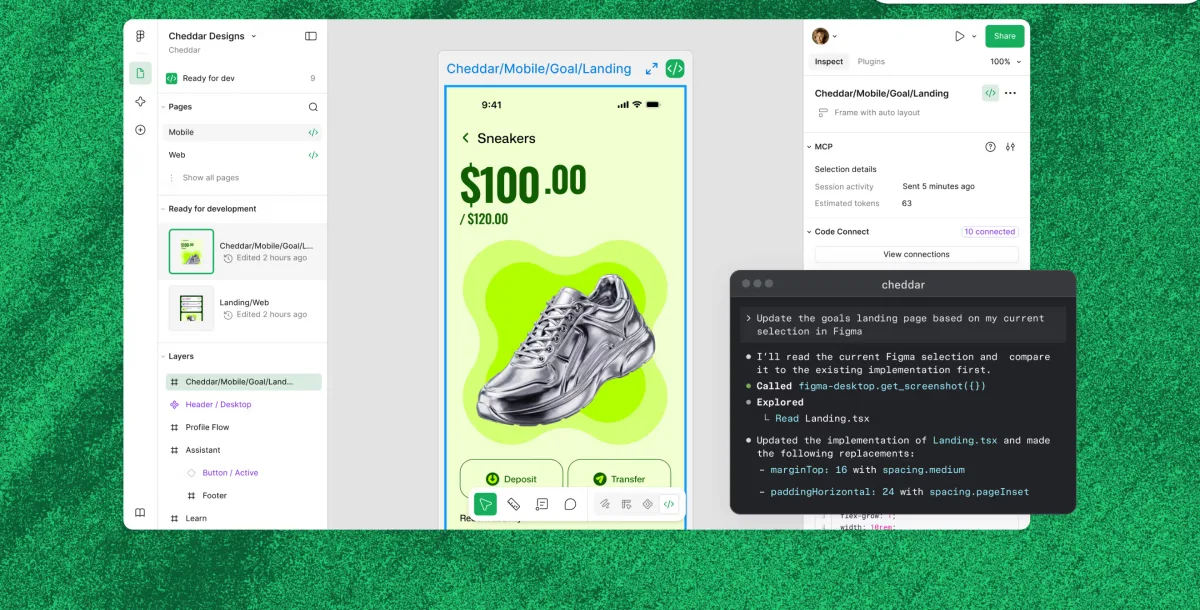
Everything runs in the browser without installation. Multiple people can work in the same file simultaneously — clients can comment on designs, developers can extract measurements and CSS via Dev Mode. That combination made Figma the industry standard.
Pros & Cons
Pros
- Industry standard for design handoffs
- Real-time collaboration in the browser
- Free Starter plan for small projects
- Auto-layout and variables for design systems
- Dev Mode simplifies developer handoff
Cons
- Starter limited to 3 team files
- Euro prices mirror dollar figures 1:1
- Graphic design better suited to Canva
Key Features
- Design & prototyping: Vector design, auto-layout, components, and variables for scalable design systems; prototypes with click interactions for client presentations.
- Real-time collaboration: Multiple users in the same file simultaneously — clients can view via link and comment with a free Figma account.
- Dev Mode: Developers get measurements, spacing, CSS values, and exportable assets directly from the file — clean handoff.
- Team libraries (Professional): Share and maintain consistent components, colors, and typography across multiple projects.
- FigJam: Digital whiteboard for workshops, brainstorms, and user flow diagrams — 3 boards included in the free plan.
- Plugins & integrations: Extensive plugin ecosystem (icons, stock photos, accessibility checks) plus connections to Jira, Slack, GitHub, and more.
Why Figma Makes Sense for Freelancers
For UI/UX and web design freelancers, Figma is a market requirement. Clients from agencies and tech companies hand over briefs in Figma, expect deliverables in Figma, and review designs via Figma links. How Figma fits into a complete setup is covered in our guide to the UX/UI tool stack for freelancers.
The free Starter plan — 3 team files (3 pages each), unlimited editors and drafts — covers first projects, portfolio work, and individual client engagements. Once multiple projects run in parallel or team libraries are needed, Professional is the natural next step.
Figma is a design tool, not a template tool. Freelancers primarily creating social media graphics, presentations, or marketing materials will find Canva more accessible and affordable.
Figma pricing 2026: what the seats cost
Figma prices per seat type, not per user — which is where most cost estimates go wrong. Anyone who designs needs a Full Seat. Anyone who only pulls developer specs needs a Dev Seat, and anyone who just comments needs a Collab Seat at a fraction of the price. A team of one designer and three commenters does not pay four full rates.
The two upper plans are billed annually only. Every paid Full Seat carries a monthly AI-credit allowance; the free Starter plan gets a daily allowance with a monthly cap.
Pricing
Starter
Free
free forever
- 3 design files per team
- 3 FigJam boards
- 3 files, max. 3 pages each — draft collaborators view-only
Professional
$16
Full Seat/month billed annually ($20 monthly) · Dev Seat $12 ($15) · Collab Seat $3 ($5)
- Unlimited files & projects
- Team design libraries
- Full version history
Organization
$55
Full Seat/month, annual billing only · Dev Seat $25 · Collab Seat $5
- Unlimited teams
- Centralized admin tools, shared libraries and fonts
- Design system analytics
Enterprise
$90
Full Seat/month, annual billing only · Dev Seat $35 · Collab Seat $5
- Custom workspaces
- Advanced admin & security
- Governance+ add-on
Prices may change — check the official website for current plans.
Alternatives by use case


Frequently Asked Questions
Is Figma free?
Yes — the Starter plan is permanently free. It allows 3 Figma Design files and 3 FigJam boards per team, unlimited editors, and unlimited personal drafts. For most solo freelancers with few active projects, that's sufficient. Professional (from $16/month per Full Seat) removes all limits.
Do I need Figma Professional as a freelancer?
Not necessarily. The Starter plan works for simple projects, portfolio presentations and individual client projects. Professional makes sense once you need more than 3 active files simultaneously, want to use team libraries, or regularly work with developers via Dev Mode.
What happened to Adobe XD?
Adobe put XD into maintenance mode in May 2023 — no new features, only bug and security fixes, no official end-of-life date, and it is no longer sold on its own. Figma is now the clear market standard for UI/UX design. If you're just starting out in this field, there's no longer a good reason to pick Adobe XD.
Can clients view Figma designs for free?
Clients don't need a paid seat: with a free Figma account they can view and comment on your files, and viewing via link works even without logging in. This makes Figma very practical for client presentations and feedback rounds.
What are the Figma Free plan limitations in 2026?
The Starter (Free) plan in 2026 has four meaningful limits: 3 Figma Design files per team, 3 FigJam boards per team, max. 3 pages per file, and version history limited to 30 days. Personal drafts (your private files) are unlimited and don't count toward the team limit. Starter has no Dev Mode — only the basic inspection in design mode (measurements, copying CSS/iOS/Android snippets). Annotations, advanced inspection, codegen plugins and the MCP server need a Full or Dev Seat on a paid plan. For a single freelancer working on a few active projects at a time, the Starter plan is sufficient; teams or designers handling 4+ live client projects simultaneously will hit the 3-file team limit fast.
What does Figma Professional cost for freelancers in 2026?
Figma prices per seat type, not per user — which is where most estimates go wrong. Anyone who designs needs a Full Seat; anyone who only pulls developer specs needs a Dev Seat, and anyone who just comments needs a Collab Seat at a fraction of the cost. A team of one designer and three commenters does not pay four full rates.
Figma Dev Mode 2026: what does it cost and is it worth it?
Dev Mode is the developer-handoff feature that lets engineers inspect designs, copy code and view component specs. In the seat-type model it is included on the Full Seat and available as the cheaper Dev Seat for developers who never design. For a solo freelancer handing files to one developer, buying that single Dev Seat is usually cheaper than a second full licence.
Figma Make (AI design): what does Figma's AI offer in 2026?
Figma's AI features in 2026 include: Make (Figma's prompt-to-app tool — describe an app in text or attach a design and get a working prototype with editable code; a snapshot can be copied into Figma Design as layers), the Figma agent (beta, replacing First Draft since May 2026 — generates and edits designs via chat on the canvas), AI replace content (swap copy and images via prompts), auto-rename layers (semantic naming via AI), and image generation and editing via Figma Weave (not on Starter). Most AI features are included on Professional and above with usage limits; the Free plan gets limited AI credits per month. For freelancers exploring AI-assisted design workflows, Figma Make is currently the strongest tool inside an established design app — a solid alternative to Google Stitch or v0 when you want to keep iterating inside the design app.
Figma vs Adobe XD vs Sketch in 2026 — which one to learn?
Learn Figma. It's the market standard in 2026, full stop. Adobe put XD into maintenance mode in 2023; remaining XD users have migrated. In the UX Tools survey 2024, 82 % of designers named Figma as their primary UI tool and under 2 % Sketch — once the market leader, now a Mac-only niche. For freelancers, the practical reality: clients will assume you know Figma, recruiters filter for Figma, design files for handoff will be Figma. The exceptions: legacy enterprise contracts and certain print-design contexts where Affinity Designer is the better choice. For UI/UX freelance work in 2026: Figma is non-negotiable.
Verdict
For UI/UX and web design freelancers, Figma isn't optional — it's the industry standard. The free Starter plan covers simple projects and portfolio work. Once you're running multiple client projects in parallel or collaborating regularly with developers, Professional ($16/month per Full Seat) is the logical next step. For pure template and graphic design work without UI focus, Canva is more accessible and cheaper.