Later Review 2026: Pricing, Plans and Who It Actually Suits
Fastlancer Team · Updated: Sep 1, 2026
Short verdict
Ideal for
- Freelancers on image-led channels — Instagram, TikTok, Pinterest
- Social media managers who need client approvals (Growth and up)
- Anyone who wants to see how the profile grid looks before posting
- Small teams up to four people — beyond that it gets expensive
Not ideal for
- Anyone who wants to schedule for free permanently
- Teams over four people
- Channels that are not image-led — LinkedIn, X, newsletters
- Entry price
- From $1,875 / month
- Free to start?
- Yes — 14 days free, no credit card required
- Stands out for
- The visual calendar: you plan posts as a grid and see your Instagram profile before your followers do.
What Later does differently
Most social schedulers are calendars with text boxes. Later inverts that: you drag images into a grid and watch how your Instagram profile will look once everything is published. It sounds like a gimmick, and it is the single reason Later has held its ground for years — if you think of a profile as one visual unit, you plan faster and more consistently than in any list view.
Supported networks are Instagram, TikTok, Pinterest, LinkedIn, Facebook, X, YouTube and Threads. The focus is clearly on the first three.
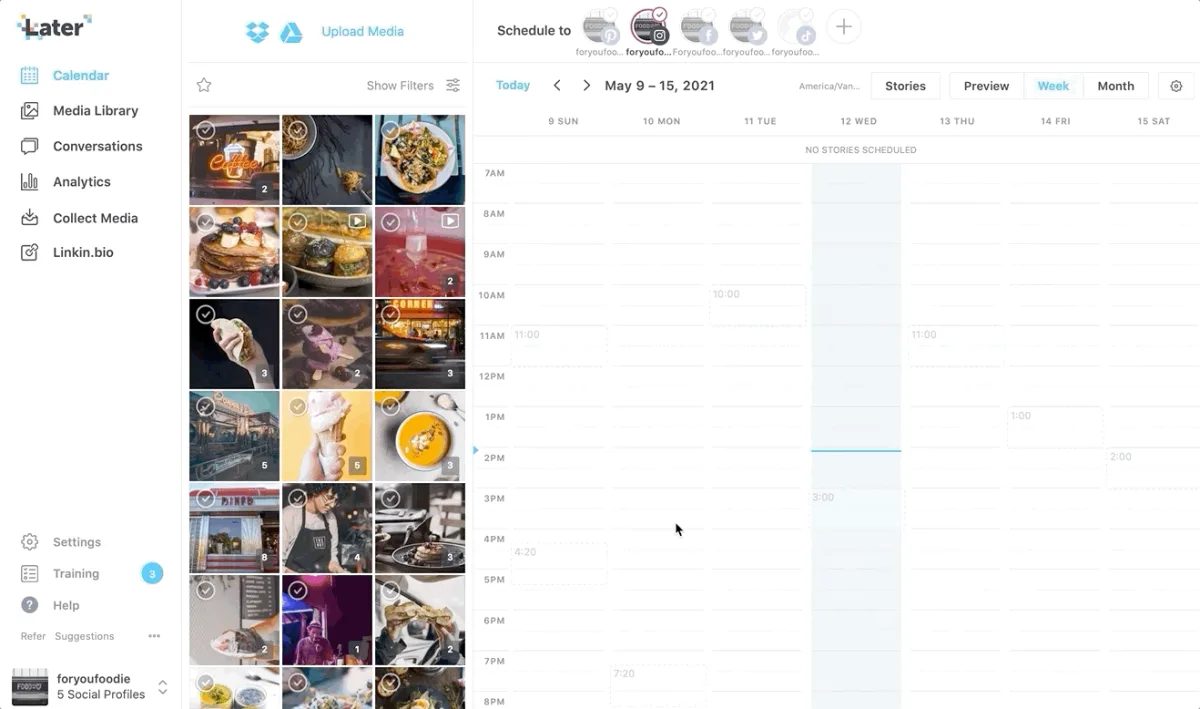
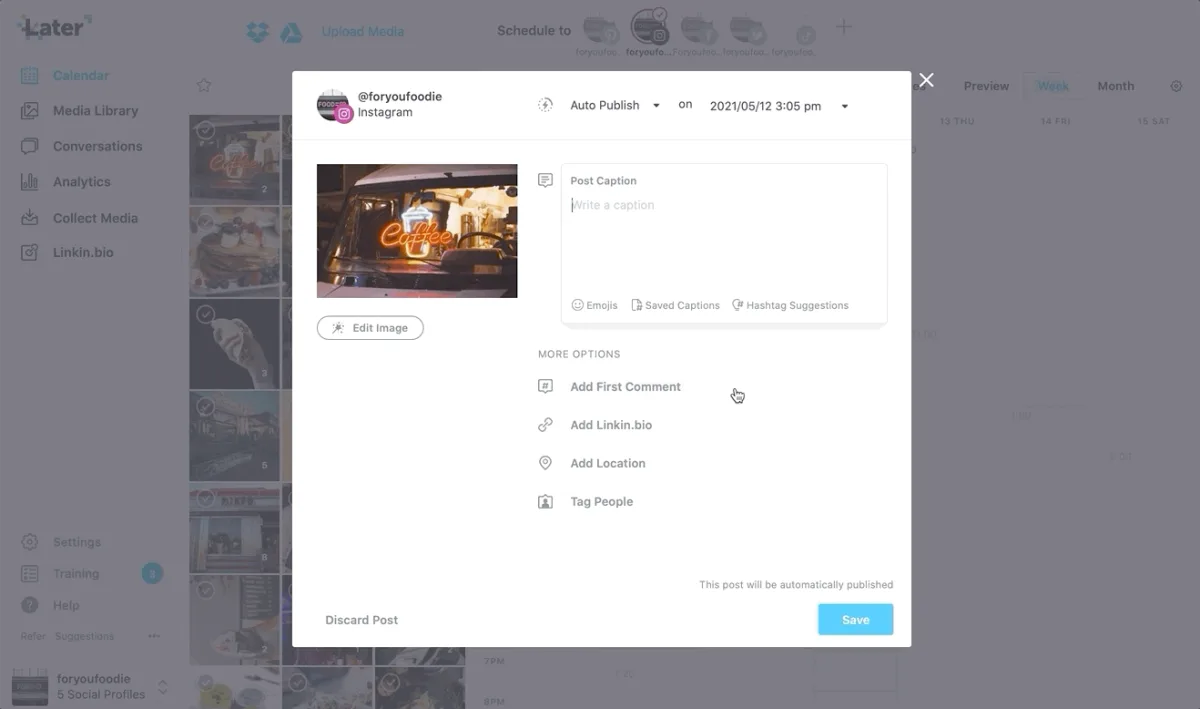
Video: product walkthrough from the official @latermedia channel — shows the flow from upload to scheduled post.
Pricing, and what the numbers actually mean
The advertised figure is the annual rate expressed per month — booked monthly it costs noticeably more. That is the most common reason the first invoice surprises people.
The ladder follows seats and approval workflows: the entry plan carries one user, client approvals arrive on the middle tier, and beyond four people it gets expensive quickly. There is no permanently free plan.
When Later pays off — and when it doesn't
- Instagram, TikTok or Pinterest is your main channel
- you post regularly and batching saves you real time
- you need client approvals (included from Growth)
- you mostly schedule text on LinkedIn and X
- you are looking for a permanently free plan
- you work alone and post only occasionally
What we like about Later and what we don't
Pros
- Best visual calendar, see grid first
- Client approvals from Growth, no surcharge
- 14 days full access, no card
- Covers Instagram, TikTok, Pinterest, LinkedIn, more
Cons
- No permanently free plan
- One user on Starter, $50 for more
- Default pricing shown is annual rate
How it compares
Among social schedulers, Later is the specialist for image-led channels. Buffer is cheaper and leaner, SocialBee stronger on recurring content, Hootsuite broader and considerably more expensive. If you are weighing several options, our overview of marketing tools for freelancers puts them side by side.
Pricing
Starter
$18.75
per month billed annually · $25 monthly
- 1 social set (8 profiles), 1 user
- Visual calendar and post planning
- Basic analytics
Growth
$37.50
per month billed annually · $50 monthly
- 2 social sets (16 profiles), 2 users
- Client approval workflows
- Social inbox and per-profile best times to post
Scale
$82.50
per month billed annually · $110 monthly
- 6 social sets (48 profiles), 4 users
- Meta Ads analytics and custom reporting
- Competitive benchmarking and brand mentions
Prices may change — check the official website for current plans.
Price history
Checked Oct 16, 2026 · 3 plans unchanged since Aug 31, 2026
Alternatives by use case
- SocialBee If posts should be recycled across many channels
- Vista Social If several clients and review management come with it
- Zoho Social If one brand is all there is and price matters


Frequently Asked Questions
How much does Later cost in 2026?
The advertised figure is the annual rate expressed per month — booked monthly it costs noticeably more, which is the most common billing surprise. The ladder follows seats and approval workflows: the entry plan carries one user, client approvals arrive on the middle tier, and beyond four people it gets expensive. There is no free plan.
Is there a free version of Later?
No. Later has no permanently free plan — just a 14-day trial with full features and no credit card required. If you need a tool that stays free, our marketing tools comparison lists alternatives with a genuine free tier.
Later or Buffer — which should you pick?
It comes down to your channels. Later earns its price when images lead: the visual calendar shows your Instagram grid before it goes live. Buffer is leaner and cheaper if you mostly schedule text on LinkedIn and X. For plain scheduling without a visual requirement, Later is more tool than you need.
How many accounts are included?
Later counts in “social sets”: one set covers eight profiles, roughly one channel per network. Starter includes one set, Growth two, Scale six. If you manage several clients you need Growth or above — one set cleanly separates exactly one brand.
Is Later worth it for a solo freelancer?
If Instagram or TikTok is your main channel and you post regularly, yes — the time saved by batch planning and the grid preview justify the $25. If you post sporadically or only on LinkedIn, that budget goes further in a simpler scheduler.
Verdict
You buy Later for the visual calendar, not for the feature count. If you work Instagram, TikTok or Pinterest seriously and want to see what your profile looks like after the next post, this is the best tool for it. If you mostly schedule text, or you need something that stays free, look elsewhere. The $25 entry point is fair, and 14 days is enough to decide honestly.