1Password Review: The Password Manager for Freelancers
Tim Wittke · Updated: Jul 24, 2026
Short verdict
Ideal for
- Freelancers with many client logins who want to tame the password chaos
- Teams and small agencies that need to share passwords securely
- Anyone who values ease of use over saving the last dollar
Not ideal for
- Anyone who wants a permanently free option
- People who prefer to keep their vault local rather than in the cloud
- Entry price
- Free plan · paid from $299 / month
- Free to start?
- Yes – 14 days free, no card required
- Stands out for
- The most polished password manager: top-tier security with an interface even non-technical users understand instantly.
As a freelancer, you juggle multiple clients, tools, platforms, and logins every single day. That's where 1Password comes in: a smart password manager from Canada that doesn't just store your credentials but makes your entire digital workflow more secure and efficient. Especially if you manage multiple client accounts and access to various platforms, a reliable password manager quickly becomes indispensable.
What Is 1Password?
With 1Password, you can securely store passwords, credit card details, confidential notes, and even two-factor authentication codes in one centralized, encrypted vault. If you frequently switch between devices or work remotely, 1Password becomes a real productivity booster.
Key Features of 1Password
Password Vaults – Create separate vaults for different clients, projects, or categories. Keep personal logins separate from client API keys and business accounts.
Autofill – Automatically fill in logins, forms, and payment details. This saves time and reduces errors, especially for frequently used platforms like project management or accounting tools.
Password Generator – Generate strong, unique passwords instantly. No more reusing passwords or trying to memorize complex combinations.
Two-Factor Authentication (2FA) – Manage your 2FA codes directly inside 1Password instead of using separate apps, a significant convenience upgrade.
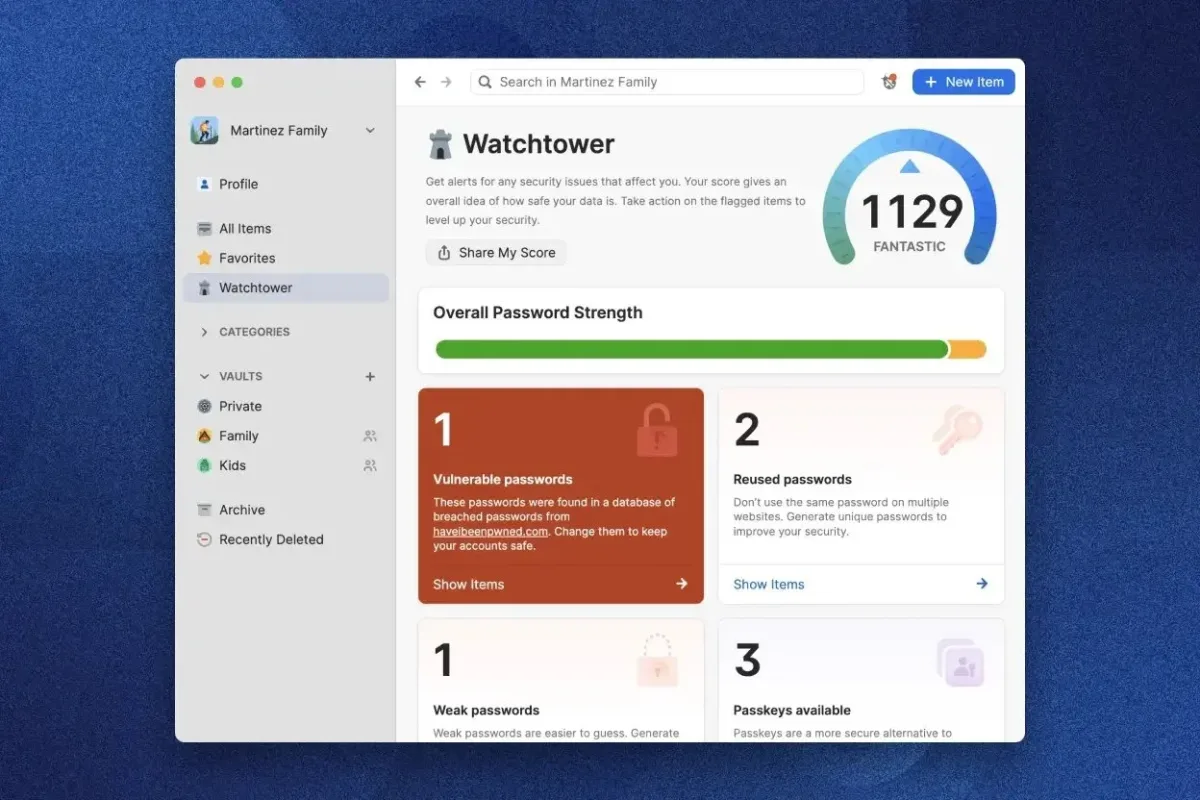
Watchtower – Watchtower scans your stored credentials for vulnerabilities, such as reused or compromised passwords. It helps you stay proactive about security.
Cross-Platform Access – Works on Windows, Mac, iOS, and Android. Start working in a café on your iPad and continue later on your desktop.
Together, these features make 1Password more than just a password vault – it becomes your digital keychain for everyday work.
Why Is 1Password Ideal for Freelancers?
As a self-employed professional, you want to work efficiently and securely without dealing with password chaos. 1Password helps you:
Increase productivity: Spend less time searching, resetting, or managing passwords.
Protect client data: Many clients entrust you with sensitive access credentials – manage them professionally.
Stay organized: Structure logins by client, project, or platform.
Work flexibly: Access your credentials securely from anywhere.
1Password Tested: Our Experience
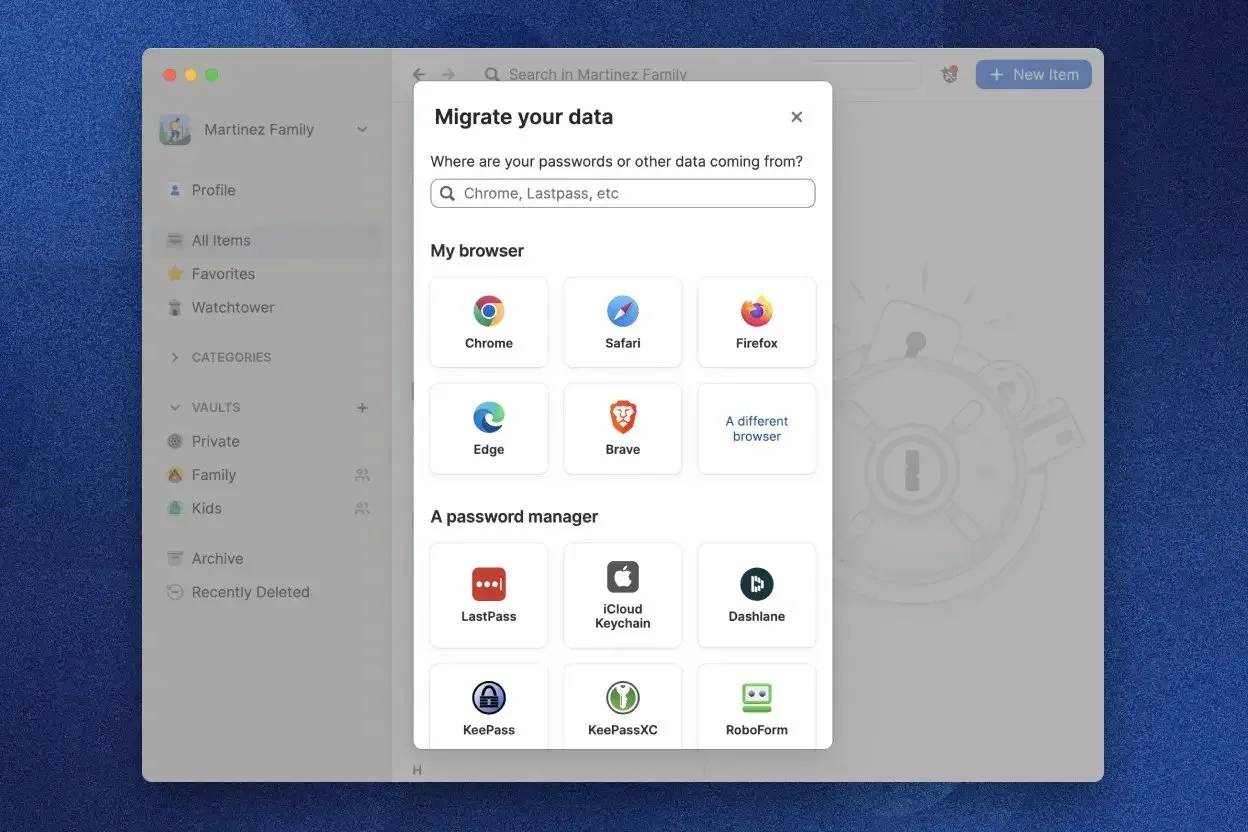
Put through a freelancer workflow with several client vaults, 1Password holds up fast: the setup is the most thought-through in the field. Importing from another manager is guided, the browser extension detects login fields reliably, and autofill works even on the clunky portals where other tools stumble.
In daily use the vault structure stands out: one vault per client, shared only with the people who need access – it fully replaces the unsafe habit of sending credentials over email or chat. During the test, Watchtower flagged two reused passwords and one login that had surfaced in a known data breach. Those proactive alerts are exactly what set it apart from a plain password safe.
The honest downside from our experience: there's no permanently free tier, and versus Bitwarden you pay a comfort premium. If you're willing to configure more yourself, the open-source alternative saves money. For anyone who just wants a solution that works, 1Password clearly justifies its price in testing.
1Password Black Friday 2026: what to expect
Here Black Friday is a genuine special price — but only on the personal plans, and only for the first year.
| Year | What was offered | Window |
|---|---|---|
| 2024 | 50% off the first year on Individual and Families | to 3 December |
| 2025 | 50% off the first year | the discount was still up in mid-December |
| Rest of the year | 25% standing discount | ongoing |
| Teams and Business | no promotion in either year | — |
On Black Friday 2025 the pricing page showed Individual and Families with a struck-through price and Teams and Business without one. The widely repeated claim that the discount covers all plans including the business tiers is contradicted by 1Password's own pages.
For our readers that distinction is the whole story. Licensing for a business gets you nothing in November. Buying for yourself doubles the standing discount — as a new customer, on the annual plan, for the first term only. From the second year the regular price applies.
Pros & Cons
Pros
- Proven AES-256 encryption
- Works on Mac, Windows, iOS, Android
- Travel Mode hides data at borders
- Well-designed, beginner-friendly interface
- Secure password sharing for teams
Cons
- No free permanent plan
- Pricier than Bitwarden
- No local storage option
1Password Pricing
1Password is not free, and that is the main difference from Bitwarden. The ladder follows headcount: an individual plan, a family plan for up to five, a flat package for small teams up to ten, and above that per-user billing with advanced permissions and admin controls.
The team package is where it is decided: as soon as credentials get shared regularly with developers, assistants or partners, it works out cheaper than several individual accounts. Every plan comes with a 14-day trial.
Pricing
Individual
$2.99
per month, billed annually
- 1 user
- Unlimited passwords & devices
- Watchtower security check
Families
$4.49
per month, up to 5 people
- 5 users included
- Separate private vaults
- Shared family vaults
Teams Starter Pack
$24.95
per month, up to 10 people
- 10 users included
- Shared team vaults
- Permission & access controls
Business
$8.99
per user/month
- Advanced admin controls
- SSO & SCIM provisioning
- Activity logs
Prices may change — check the official website for current plans.
Alternatives by use case
- Proton Mail If encryption across the whole workday matters, not just passwords
- Proton for Business If a team should work encrypted together


Frequently Asked Questions
How much does 1Password cost in 2026?
The Individual plan is $2.99/month (billed annually), Families is $4.49/month for up to 5 people. For teams there's the Teams Starter Pack at $24.95/month (up to 10 users) and the Business plan at $8.99 per user/month. Every plan comes with a 14-day free trial. There is no permanently free tier.
Is 1Password secure?
Yes. 1Password encrypts all data with AES-256 on a zero-knowledge basis – the provider itself cannot read your passwords. On top of your master password, a device-side Secret Key protects your vault, and the architecture is regularly audited by independent firms. Even if a server were breached, the data is worthless without your Secret Key.
1Password vs Bitwarden – which is better?
Bitwarden is open source, cheaper and has a usable free tier – the right pick when budget and transparency matter most. 1Password costs a bit more but wins on a more refined interface, extras like Travel Mode and Watchtower, and more mature team management. Choose 1Password for comfort; choose Bitwarden to save money or if you prefer open source.
Is 1Password free?
No, 1Password does not offer a permanently free plan. You can try any plan free for 14 days without entering payment details. If you need a genuinely free solution, Bitwarden or the open-source tool KeePassXC are the better fit.
Is 1Password worth it for freelancers?
Yes – as soon as you manage more than a handful of client logins. Separate vaults per client, autofill and the Watchtower check noticeably save time day to day and cut the risk of leaked credentials. For around $3 a month it's one of the cheapest ways to protect your professional livelihood.
Is 1Password cheaper on Black Friday?
On the personal plans yes: in both recent years 1Password doubled its standing discount on Individual and Families for the first year, for new customers on the annual plan. From the second term the regular price applies again. Teams and Business saw no promotion in either year — on Black Friday itself 1Password's pricing page showed the business tiers without a struck-through price while the personal plans had one. Licensing for a team, waiting gains you nothing.
Verdict
1Password isn't a bargain, but it's worth every cent if security and ease of use go together for you. For freelancers with many client logins it brings order to the password chaos, protects sensitive data professionally, and after the 14-day trial it's usually hard to work without. If you want to start for free, go with Bitwarden – for everyone else, 1Password is our recommendation in the security category.