Gusto: Payroll and HR for Small US Businesses
Fastlancer Team · Updated: Jul 20, 2026

Short verdict
Ideal for
- US businesses and freelancers with a US entity hiring their first employees
- Single-owner LLCs paying themselves or 1099 contractors
- Small teams (1–50 employees) that want payroll, taxes and benefits in one place
- Non-accountants who want to automate payroll tax filing
Not ideal for
- Businesses employing people outside the US
- Solo freelancers with no payroll at all
- Anyone who depends on fast support
- Entry price
- From $35 / month
- Free to start?
- Free to set up — billing starts with your first payroll run (no fixed trial)
- Stands out for
- Automatic payroll with federal, state and local tax filing — plus benefits and HR in one tool
Gusto is one of the most popular platforms in the US for combining payroll, benefits and HR for small businesses. For self-employed people making the jump from solo to their first team — or running a US entity — Gusto takes on arguably the most unpleasant task: filing US payroll taxes correctly.
What is Gusto?
Gusto is a payroll and HR platform for small US businesses. At its core is full-service payroll: Gusto calculates, files and pays payroll taxes automatically at the federal, state and local level — the point where many US small-business owners get stuck. On top of that come benefits administration (medical, dental and vision insurance, 401(k) retirement, HSA/FSA), onboarding with e-signature, time tracking (from Plus) and contractor payments. The pitch: everything around pay and people in one place.
The real value: automatic taxes
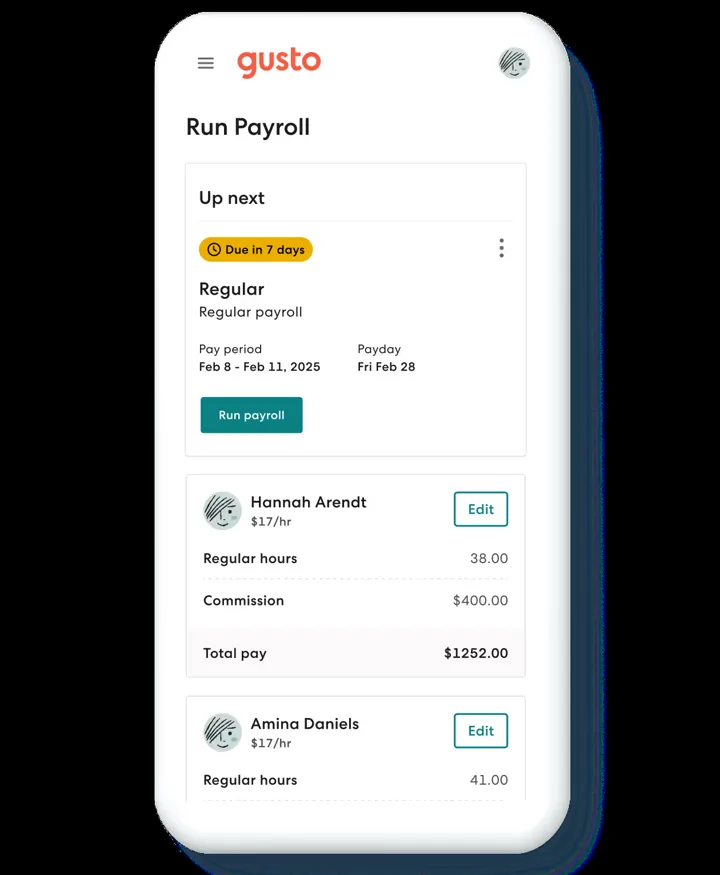
For a non-accountant, automatic tax filing is the decisive argument. Gusto handles calculation, filing and payment of payroll taxes across all three US levels and generates W-2 and 1099 forms automatically at year-end. Its "AutoPilot" feature even runs payroll on its own for consistent salaries. That's why Gusto is especially popular with first-time founders and small teams who don't have a dedicated payroll specialist.
Benefits and international contractors
Two things set Gusto apart from pure payroll tools. First, benefits: Gusto brokers insurance through its own licensed brokers — you pay only the premium, no separate admin fee. Second, international contractor payments: Gusto pays 1099 contractors in 120+ countries in their local currency with no monthly per-contractor fee. Note the limit: Gusto cannot run payroll for regular employees (W-2) outside the US — international here means contractors only.
What does Gusto cost?
Gusto bills in US dollars, always as a base price plus an amount per person — so the headline figure is never the bill. A contractor-only plan covers businesses working with freelancers alone; the entry payroll tier handles full-service single-state payroll, the next adds multi-state payroll and time tracking, and the top one a dedicated advisor.
There is no classic trial and no permanently free plan. Setup is free and billing starts with your first payroll run, which is the practical way to evaluate it.
Who is Gusto worth it for?
Gusto suits US-based solo founders and small teams (roughly 1–50 people) who don't want to juggle payroll, taxes and benefits themselves. For non-US payroll it isn't the tool — outside the US, Gusto is only relevant to freelancers with a US entity or team. If you fit that role, you get a clean, understandable system; the one real downside is the frequent support complaints once tax questions get complicated.
Pros & Cons
Pros
- Automatic payroll tax filing, all US levels
- Payroll, benefits, health insurance, 401(k), HR combined
- No separate admin fee on benefits
- Contractor payments in 120+ countries
- Very easy setup, intuitive interface
Cons
- US-only: no payroll for non-US employees
- Customer support is the most common complaint
- Dedicated advisor only on Premium plan
Pricing
Contractor Only
$35
base/month + $6/contractor · 1099 only
- 1099 contractor payments
- Automatic 1099 creation & filing
- Billed only in months a contractor is paid
Simple
$49
base/month + $6/employee
- Full-service single-state payroll
- Automatic federal/state/local tax filing
- Unlimited payroll runs, direct deposit
Plus
$80
base/month + $12/employee
- Everything in Simple
- Multi-state payroll
- Time tracking & PTO management
Premium
$180
base/month + $22/employee
- Everything in Plus
- Dedicated HR / service advisor
- Priority support & compliance help
Prices may change — check the official website for current plans.
Alternatives by use case



Frequently Asked Questions
What is Gusto?
Gusto is a US payroll and HR platform for small businesses. It runs full-service payroll including automatic tax calculation and filing at the federal, state and local level, manages benefits, health insurance and 401(k) retirement, and covers onboarding and time tracking. Important: Gusto is built for the US market — there's no regular payroll for employees located outside the US.
How much does Gusto cost in 2026?
Gusto bills as a base price plus an amount per person, so the headline figure is never the bill. A contractor-only plan covers businesses working with freelancers alone; the entry payroll tier handles full-service single-state payroll, the next adds multi-state and time tracking, the top one a dedicated advisor. There is no trial and no free plan — billing starts with your first payroll run.
Does Gusto work for a single-owner LLC?
Yes. A single-owner LLC can pay itself through the Simple plan ($49 + $6) — S-corp owners paying themselves a salary is a common use case. If you only work with 1099 contractors and have no employees, Contractor Only ($35 + $6/contractor) is cheaper. In both cases Gusto handles tax filing automatically.
Gusto vs QuickBooks Payroll — which is better?
At entry level they cost almost the same (Gusto Simple $49 + $6/employee, QuickBooks Payroll Core about $50 + $6.50). QuickBooks is the better pick if you already use QuickBooks accounting, and it allows multi-state on the entry tier — though it bills extra per additional state. Gusto offers fuller HR and benefits features already on Simple; multi-state requires Plus.
Can Gusto pay overseas workers?
Only contractors, not regular employees. Gusto pays 1099 contractors in 120+ countries in their local currency with no monthly per-contractor fee (just a small service and FX fee per payment). It does not run W-2 payroll for employees outside the US — for that you'd need an employer-of-record service.
Verdict
Gusto is one of the simplest ways to combine payroll, benefits and HR in one place in the US — especially for solo founders and small teams hiring their first employees who don't want to file complex US payroll taxes themselves. The clear limit: Gusto is a US product. It's not built for non-US payroll — outside the US it's relevant only for freelancers with a US entity or team. Within that scope it's a solid, user-friendly choice, provided you can live with the support-heavy growing pains. Find more business-setup tools in our <a href="/en/finanzen-tools-freelancer/">finance overview</a>.