Proton Pass Review 2026: Password Manager with Email Aliases from Switzerland
Fastlancer Team · Updated: Nov 17, 2026
Short verdict
Passwords, 2FA codes and email aliases in one place
- Freelancers who sign up for new tools, trials and newsletters all the time and want to keep their real email address off spam lists
- Solo users who want a password manager with no device limit that stays free
- Anyone who wants logins, 2FA codes and passkeys with an open-source, Swiss-based provider outside US jurisdiction
- Teams that need groups, single sign-on and an activity log on the cheapest team plan
- Anyone happy with Bitwarden or 1Password who doesn't need email aliases
What Proton Pass does for you
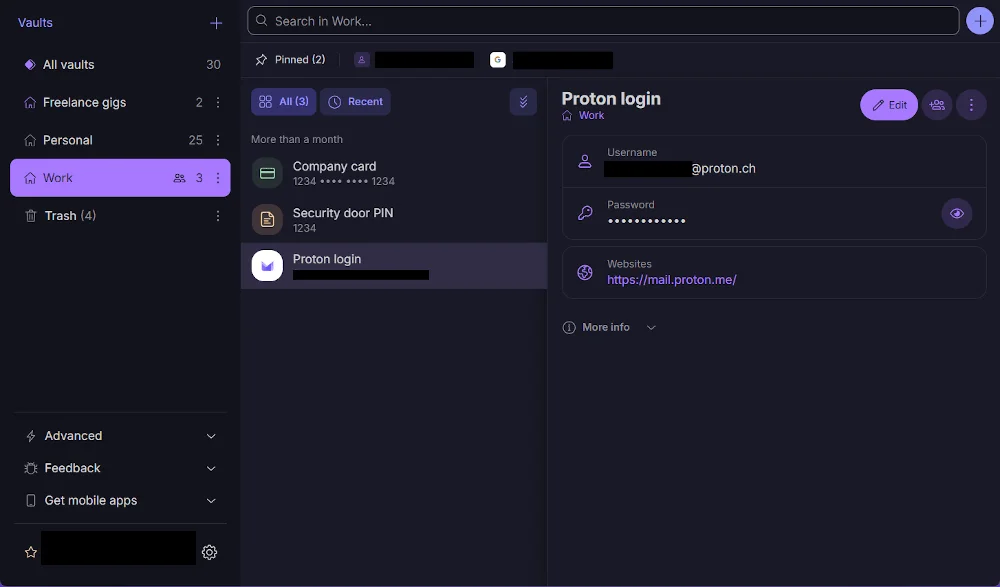
Freelancing means signing up for things constantly: new tools, free trials, client portals, newsletters. Every signup leaves a password and your email address in yet another database. Proton Pass keeps those logins in an encrypted vault, autofills them in your browser and apps, and generates a strong password for each new account.
You can organize the vault by area, say one vault for client projects and one for personal accounts. Besides logins, Proton Pass stores passkeys, notes, credit cards and identity details. Alerts for weak and reused passwords show you which logins to change first.
Email aliases keep your address private
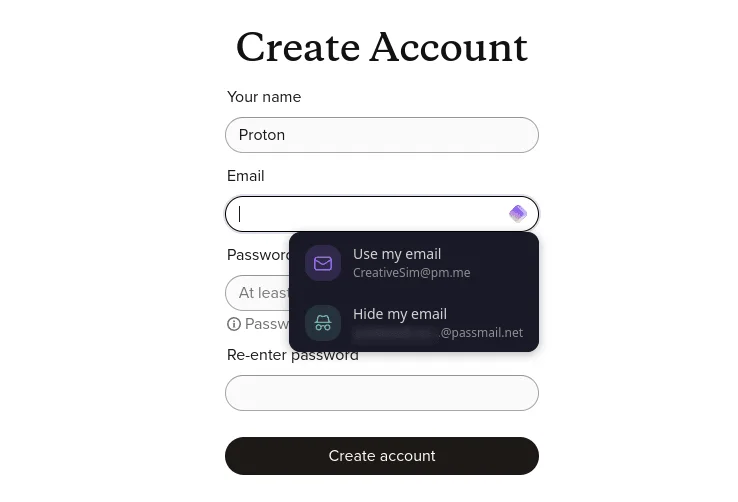
The real difference from other password managers is the aliases. Click into the email field on a signup form and Proton Pass offers a fresh burner address next to your real one. Mail sent to the alias lands in your regular inbox, but the service never learns your actual address. If that service gets breached or sells its list, you switch the alias off instead of changing your main email.
There's a second payoff for freelancers: because every signup gets its own alias, you can tell exactly which service leaked or sold your address. You can reply from an alias on every plan; Pass Plus also lets you start new emails from it and use your own domain. If you already use Proton Mail, the aliases show up there too.
2FA codes and passkeys in the same record
On paid plans, Proton Pass replaces a separate authenticator app. You save a service's 2FA setup key right in the login, and the extension fills in the password and then the code. Passkeys are supported on every plan and sync across all your devices.
Keeping passwords and second factors in one vault is a trade-off: it's more convenient, while a separate app remains the stricter setup. For client logins you need in a hurry, convenience usually wins.
Proton Pass pricing: renewals and team plans
The tiers come down to two questions: are ten aliases and the core features enough, and do you work alone? For solo freelancers, Pass Plus is the sensible upgrade; Unlimited only pays off together with Proton Mail or Drive. Teams need a business plan, which always bills at least three users, and Essentials tops out at 30.
The catch is the first year. Proton often advertises steep discounts on the first term, then renews at the regular yearly price shown in the plan cards. Check the renewal line at checkout and cancel in time if the price no longer works for you.
What we like about Proton Pass and what we don't
Pros
- Generous free plan, no device limit
- Email aliases right in the signup form
- 2FA codes inside the login record
- Open source and independently audited
- Apps for every major platform
Cons
- 2FA authenticator only on paid plans
- Team plans start at three users
- Fewer integrations than older rivals
Proton Pass is the password manager for people who create lots of accounts and don't want to leave their email address everywhere. More options are in our password manager overview.
Pricing
Free
$0
- Unlimited passwords, passkeys and devices
- 10 email aliases
- Two vaults, shareable with up to two people
Pass Plus
$2.99 / month
- Unlimited aliases, including your own domain
- Built-in 2FA authenticator and dark web monitoring
- Share items by link, file attachments, emergency access
Proton Unlimited
$9.99 / month
- Everything in Pass Plus
- Full Proton Mail, Drive, VPN and Calendar
- 500 GB encrypted storage
Pass Essentials
$1.99 / user / month
- For 3 to 30 users
- Admin panel, enforced 2FA and dark web monitoring
- Share vaults and single items with the team
Pass Professional
$4.99 / user / month
- Single sign-on (SSO) and SCIM
- Activity log, team policies and groups
- File attachments and command line interface
Prices may change — check the official website for current plans.
Alternatives by use case


Frequently Asked Questions
What does Proton Pass do for a freelancer?
Proton Pass keeps everything you need to sign in inside one encrypted vault: passwords, passkeys, 2FA codes and payment cards. On top of that, it can create a separate email address for every new signup that forwards to your real inbox. Sign up for trials, newsletters and tools with an alias, and spam never reaches your main address. A sender that won't stop gets switched off in one click.
How much does Proton Pass cost?
Solo, the free plan often covers you. Pass Plus is worth it once you want more than ten aliases, the built-in 2FA authenticator or dark web alerts. Proton Unlimited makes sense if you'd pay for Proton Mail or Drive anyway. Teams pick Pass Essentials or Pass Professional, priced per user. Yearly billing is much cheaper than paying month to month. Exact prices are in the plan cards, checked November 2026.
Is Proton Pass really free?
Yes. The free plan never expires and has no device limit, with unlimited passwords and passkeys plus alerts for weak and reused passwords. The limits are ten aliases and two vaults. Paid personal plans come with a 30-day money-back guarantee, and team plans have a 14-day trial with no credit card.
Proton Pass vs Bitwarden: which free password manager is better?
Both are open source, end-to-end encrypted and have a solid free plan. Proton Pass has the more modern interface and adds email aliases; Bitwarden has been around longer and offers more integrations. If you create lots of accounts and want to cut spam, go with Proton Pass. If you mainly need to manage passwords, Bitwarden does the job.
Is Proton Pass safe, and who can see my data?
Proton Pass encrypts every field of a record on your device, including usernames and web addresses, so Proton can't read your vault. The apps are open source and have been audited by independent security firms, and Proton holds ISO 27001 certification. The company is based in Geneva, so your data falls under Swiss privacy law rather than US jurisdiction. Business customers can sign a data processing agreement.
Verdict
Proton Pass solves two problems at once: your logins live in one secure place, and your real email address never shows up when you sign up for something new. Its strengths are the generous free plan, the aliases and the open-source code; the weak spot is team features that only open up on the pricier Professional plan. If you work alone, you can start free with no risk.