Keeper Review 2026: Password Manager with an Admin Console for Small Teams
Fastlancer Team · Updated: Nov 17, 2026
Short verdict
Share client logins safely, revoke them in one click
- Small teams and agencies that share client logins with set permissions and need to revoke them cleanly when someone leaves
- Freelancers who hand logins to clients or contractors who don't have a Keeper account
- Businesses that need SOC 2 and ISO 27001 paperwork when a client asks how credentials are stored
- Solo users looking for a password manager that stays free forever
- Anyone expecting dark web alerts and reporting without paying for add-ons
What Keeper does for you
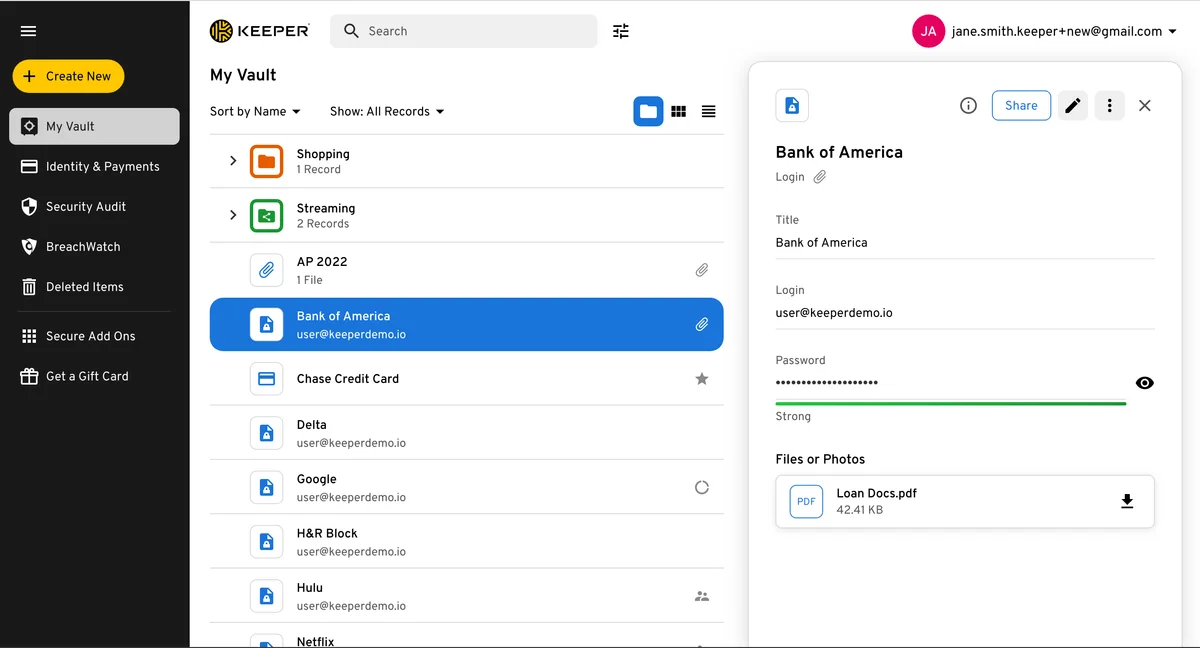
In small teams, client logins tend to end up where they shouldn't: a shared spreadsheet, a Slack thread or a sticky note on the monitor. Keeper pulls them into one encrypted vault. Passwords, passkeys, 2FA codes, payment cards and files live in one place and autofill in your browser and apps.
The real payoff starts the moment more than one person is involved. You decide who can see or edit each login and keep track of it all in the admin console. When someone leaves, you revoke their access instead of resetting every password they ever touched.
Sharing logins and taking them back
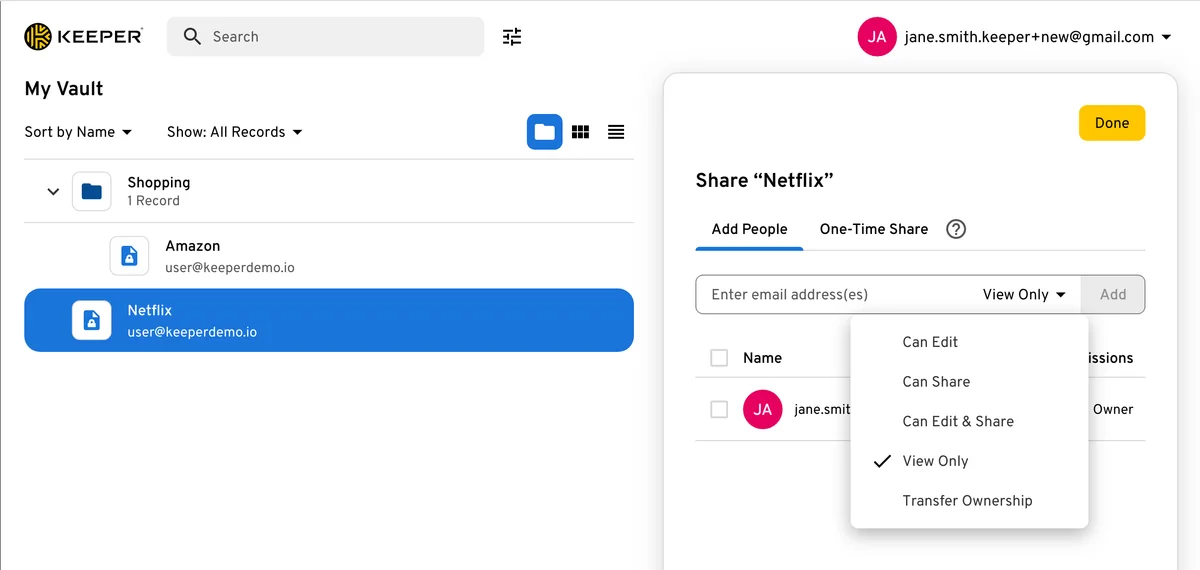
You share per record or per folder, each with clear permissions: view only, edit, re-share or transfer ownership. For a project team, set up a shared folder, and every new login inside it is instantly available to everyone on the project. When a password changes, it's current for everyone.
For freelancers, one-time share is the standout. You send a client or a contractor a login through an encrypted link that expires after a set time. The recipient doesn't need a Keeper account, and the credential never sits in someone else's inbox for good.
Security and compliance
Keeper uses a zero-knowledge model: encryption and decryption happen on your device, so the company can't read what's in your vault. It's audited for SOC 2 Type 2 and certified to ISO 27001, 27017 and 27018. Login options include authenticator apps, hardware security keys and biometrics.
That paperwork matters more than it sounds. When an enterprise client sends a vendor security questionnaire asking how you store their credentials, being able to point to an audited, zero-knowledge vault is a much better answer than a spreadsheet. Teams with clients in Europe can also host their data in Keeper's EU region.
Keeper pricing: seat minimums and add-ons
The tiers come down to one question: are you working alone or sharing logins with a team? Solo, the Unlimited personal plan is enough. For teams, Business Starter is the entry point, but it always bills at least five seats, even if there are three of you, and it stops at ten. Moving up to Business makes sense once you need team folders with group permissions or keep hiring.
The catch is the add-ons. BreachWatch dark web alerts, advanced reporting and compliance reports are each billed per user per year, extra file storage as a flat fee. Add the three per-user add-ons to Business and you pay twice the plan price. Every plan is billed yearly and renews automatically.
What we like about Keeper and what we don't
Pros
- Zero-knowledge encryption, independently certified
- One-time shares for people without accounts
- Admin console even on the smallest team plan
- Apps for every major platform
- Low per-user price for small teams
Cons
- No free-forever plan
- Dark web alerts and reports cost extra
- Business Starter caps out at ten users
Keeper isn't built for casual users. It's for teams that need order and control over client credentials, and for three to ten people it delivers a lot of admin power for the money. More options are in our password manager overview.
Pricing
Unlimited (Personal)
$3.58 / month
- One vault, unlimited passwords and devices
- Sharing and one-time shares
- Dark web monitoring is an add-on
Family
$7.67 / month
- Five private vaults
- 10 GB encrypted file storage
- Emergency access for family
Business Starter
$2 / user / month
- For 5 to 10 users, 5 seats minimum
- Admin console, policies and security report
- Sharing and autofill on every device
Business
$4 / user / month
- Shared team folders and delegated admin
- Free Family plan for every user
- Advanced integrations and org structure
Enterprise
$6 / user / month
- SSO (SAML), SCIM and Active Directory sync
- Role-based access control and developer APIs
- Advanced 2FA such as DUO and RSA
Prices may change — check the official website for current plans.
Alternatives by use case
- 1Password If your team cares most about an easy, polished interface
- Bitwarden If you're starting solo and want a free plan
- Proton Pass If you want email aliases and a privacy-first Swiss provider
- NordPass If you want a simple password manager with minimal setup


Frequently Asked Questions
What does Keeper do for a freelancer or small business?
Keeper replaces the shared spreadsheet, the sticky note and the logins pasted into Slack. Every credential for client accounts, hosting, social media and banking sits in one encrypted vault. You share single records or folders with set permissions, see in the admin console who can access what, and revoke access when a project ends or someone leaves the team.
How much does Keeper cost?
Keeper splits its plans into personal and business. On your own, the Unlimited personal plan covers you; once several people share logins and someone needs to manage permissions, you need a business plan. Dark web monitoring, advanced reporting and compliance reports are paid add-ons on top. Exact prices are in the plan cards, checked November 2026.
Is there a free version of Keeper?
There's no free-forever plan. Personal users get a 30-day trial, and teams can try Business for 14 days without a credit card. If you work alone and want something free, Bitwarden is the better fit.
Keeper vs 1Password: which is better for a small team?
Both use zero-knowledge encryption and are well audited. Keeper leans toward control, with the admin console included even on the smallest team plan. 1Password feels more polished and is quicker to roll out to a non-technical team. Pick Keeper if oversight matters most, 1Password if ease of use does.
Is Keeper safe, and can I cancel easily?
Keeper encrypts every record on your device, so the company can't read your vault. It holds SOC 2 Type 2 and ISO 27001, 27017 and 27018 certifications, and a FedRAMP High authorization for its separate GovCloud edition. You can turn off auto-renewal in your account at any time before the renewal date.
Verdict
Keeper solves the problem small teams tend to ignore until it bites: who knows which password, and how do you get it back when someone leaves? Its strengths are granular sharing permissions and strong security credentials; the weak spot is add-ons that charge extra for things like dark web alerts. If a small team shares client logins, try Business Starter and only add extras once you actually miss them.