Omnisend Review 2026: Email and SMS Marketing for Small Online Stores
Fastlancer Team · Updated: Nov 17, 2026
Short verdict
Win back abandoned carts on autopilot
- Small Shopify, WooCommerce or BigCommerce stores that want abandoned cart, welcome and post-purchase emails running on their own
- Store owners without an agency who'd rather tweak ready-made flows than build them from scratch
- Anyone who wants to see how much revenue each campaign and each automation brings in
- Freelancers and service businesses without an online store who just need a newsletter
- Merchants who want to reach support by phone
What Omnisend does for your store
Every online store loses sales every day: someone fills a cart and closes the tab, a new subscriber never hears from you again, a first-time buyer never comes back. Omnisend catches those moments with automated emails. You connect Shopify, WooCommerce or BigCommerce, and from then on Omnisend knows your products, your orders and what your visitors are browsing.
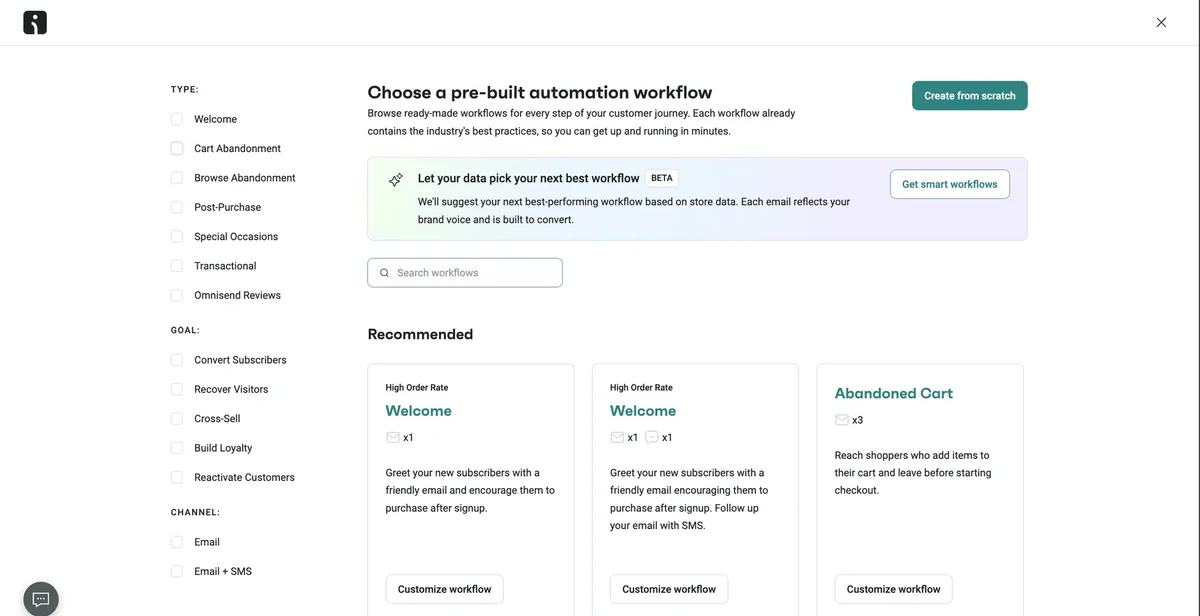
Instead of designing flows from scratch, you pick from a library of ready-made templates for welcome series, abandoned carts, browse abandonment, post-purchase and birthdays. Copy, delays and discounts are already filled in; you adapt them to your store and switch them on.
Workflows that run once you switch them on
A workflow starts with a trigger, such as an abandoned cart, and then sends emails at set intervals. It stops automatically as soon as the order comes in, so nobody gets reminded about something they already bought. Splits let you treat customers differently, for example offering a discount only on high-value carts, and A/B tests let you pit subject lines or channels against each other.
Besides email, a workflow can send browser push notifications, and on the Pro plan text messages too. You grow your list with popups, embedded forms, landing pages or a spin-to-win wheel, and you can show a form only when a visitor is about to leave.
Designing emails and tracking revenue
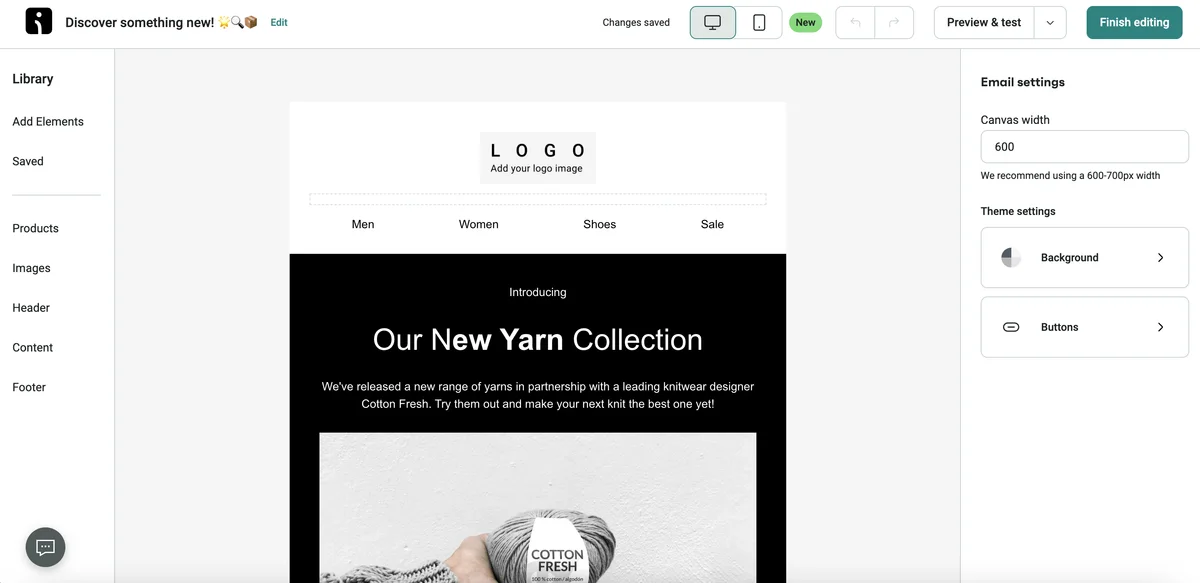
The editor works with blocks you drag into the email. Products come straight from your store with image, price and link. Omnisend generates a unique discount code for every recipient and syncs it with your store. A preview shows how the email looks on a phone.
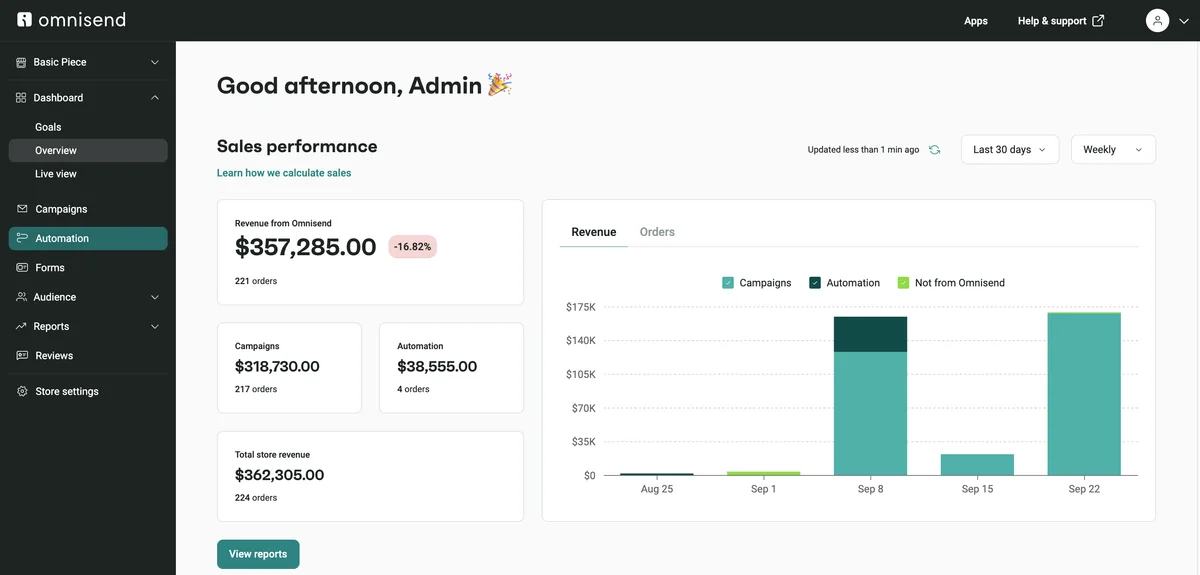
Because Omnisend sees your orders, it attributes revenue to individual campaigns and workflows. The dashboard splits sales into revenue from campaigns, from automations and from orders that happened without Omnisend. That makes it easy to spot which flow is earning its keep.
Omnisend pricing: contacts count, not subscribers
Two questions decide your plan: how many contacts you have, and whether you need SMS. Standard is enough for email-only marketing. Pro pays off once you add text messages or run short on Standard's email allowance, because when you hit it, campaigns stop sending and contacts drop out of running workflows.
The catch is how contacts are counted: customers and cart abandoners who never subscribed are billed too, so your price can climb while your subscriber count stays flat. Unsubscribing inactive contacts regularly keeps you in a lower tier. New customers save 30% on their first three months of a paid plan if they pay for them upfront.
Store integrations and support
Shopify, WooCommerce, BigCommerce and Wix connect in one click, and platforms such as Ecwid have their own integrations. Omnisend lists more than three hundred integrations in total, covering reviews, loyalty programs and ad audiences on Facebook and Google. Everything else connects through the API.
Support runs around the clock by live chat and email on every plan, including Free. Accounts that spend a few hundred dollars a month get a dedicated account expert. Omnisend also moves your lists, flows and templates over from Klaviyo, Mailchimp or another platform for free.
What we like about Omnisend and what we don't
Pros
- Ready-made flows for carts and post-purchase
- Unique discount codes synced with your store
- Revenue tracked per email and workflow
- 24/7 chat support, even on Free
- Free migration from other platforms
Cons
- Buyers who never opted in still count
- Card payments only
- No phone support
Omnisend isn't a newsletter tool for service businesses. It's a revenue tool for online stores. If you sell products through Shopify or WooCommerce, you get the most important flows ready-made and can see what they earn. More email marketing tools are in our email marketing overview.
Pricing
Free
$0
- 500 emails a month to up to 250 contacts
- Ready-made cart, welcome and post-purchase flows
- Omnisend branding on emails and forms
Standard
$16 / month
- Monthly emails up to 12x your contact count
- Custom workflows and no Omnisend branding
- No SMS, product recommendations only as an add-on
Pro
$59 / month
- Unlimited emails under a fair use policy
- SMS via a credit subscription, priced by country
- AI product recommendations, send-time optimization, advanced reports
Prices may change — check the official website for current plans.
Alternatives by use case
- Klaviyo When you want deeper segmentation and reporting and have the budget for it
- Brevo When you mostly send newsletters and don't run a store
- GetResponse When you sell services and want newsletters with landing pages and webinars


Frequently Asked Questions
What does Omnisend actually do for a small online store?
Omnisend sends the emails a store needs but nobody wants to send by hand: the reminder about an abandoned cart, the welcome after a newsletter signup, the review request after a purchase. You connect your store, pick a ready-made flow, adjust the copy and the discount, and switch it on. From then on it runs by itself, and the dashboard shows how much revenue it brings in.
How much does Omnisend cost?
Pricing is based on billable contacts and adjusts every month. That count includes not only newsletter subscribers but also customers and cart abandoners who never opted in, because they can still receive automated order emails. Only unsubscribed contacts are excluded. Standard covers email-only marketing; Pro adds unlimited sends and the AI features. Prices are in US dollars and exclude sales tax. Exact prices are in the plan cards, checked November 2026.
Is there a free version of Omnisend?
Yes. The Free plan is free forever and needs no credit card. It includes the ready-made workflows, signup forms and segmentation, but it's capped at a small number of contacts and emails per month, and emails carry the Omnisend badge. There's no trial of the paid plans, so the Free plan is how you test it with a new store.
Omnisend vs. Klaviyo: which is better for a small store?
Both are built for ecommerce and ship ready-made flows for abandoned carts, welcome series and post-purchase emails. Klaviyo goes deeper on segmentation and analytics and pays off when you have lots of data and someone on the team to work with it. Omnisend is faster to set up and usually cheaper at the same contact count. For a small store getting started without an agency, Omnisend is the easier entry point; if you grow fast, compare it with Klaviyo.
Can I cancel Omnisend anytime, and is SMS compliant in the US?
Yes. Paid plans are billed monthly and you can downgrade to Free whenever you like; the paid plan stays active until the end of the billing cycle. If you want to pause instead, Omnisend can freeze your data for a year for a one-off fee. For SMS, the signup forms collect TCPA consent, and MMS with images is available for US and Canadian recipients.
Verdict
Omnisend takes over the work that costs small online stores the most revenue when it's left undone: reminding cart abandoners, welcoming new subscribers and bringing first-time buyers back. Its strengths are the ready-made flows, the tight Shopify and WooCommerce integration and round-the-clock support. Its weak spot is card-only billing. If you run a store, start on the Free plan and upgrade once the flows bring in measurable revenue.