Fireflies.ai: AI Meeting Notes and Transcription
Tim Wittke · Updated: Aug 17, 2026
Short verdict
Ideal for
- Freelancers with frequent client calls who want to skip manual notes
- Consultants and coaches who need searchable conversation history
- Sales freelancers with HubSpot or Salesforce pipelines
Not ideal for
- Anyone summarising many calls a month — credits cap that
- Businesses that must guarantee European data residency
- Entry price
- Free plan · paid from $10 / month
- Free to start?
- Forever-free tier available
- Stands out for
- The only AI meeting assistant combining 100+ languages, AskFred AI search across all meetings, and 200+ integrations — fully testable on the free plan.
Meeting notes are one of the most disliked routine tasks in a freelancer's week — and the one most likely to end up incomplete. AI meeting assistants like Fireflies.ai promise to remove the problem entirely: a bot joins the call automatically, transcribes the conversation, produces a structured summary and extracts action items — all without you typing during the meeting. We tested Fireflies in real client calls over several weeks. Here's what works, what doesn't, and which freelancer profiles get the most out of it.
As of August 2026. Pricing is reviewed regularly — confirm on the official Fireflies pricing page before subscribing.
What is Fireflies.ai?
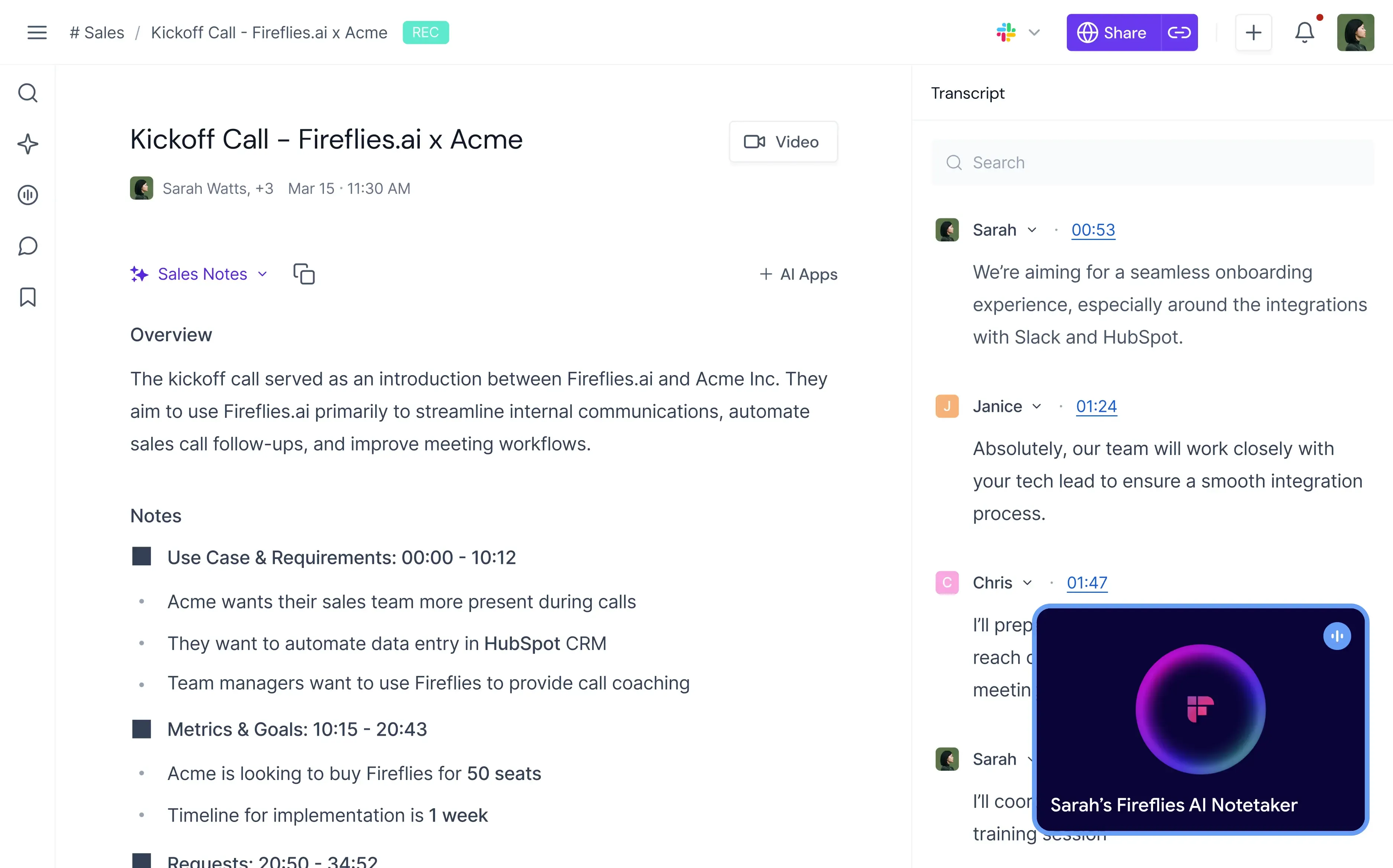
Fireflies.ai is an AI meeting assistant founded in San Francisco in 2016, now serving over 1 million users worldwide. It holds 4.7/5 on G2 and 4.9/5 on Capterra, putting it among the top-rated tools in its category. The concept is simple: a bot named "Fred" is added to your online meetings via calendar integration (Google Calendar, Outlook) — Zoom, Google Meet, Microsoft Teams or Webex. During the call, audio is recorded and live-transcribed. Within minutes after the meeting you get a complete transcript plus an AI-generated summary covering topics, decisions and action items.
The differentiator from pure transcription tools like Otter is the AI assistant layer: AskFred lets you search every meeting transcript in natural language. You can ask "What did client X say about the budget in their last Q3 call?" and Fred returns the exact quote with timestamp and speaker. For freelancers with recurring clients, this is a meaningful workflow advantage — verbal commitments made six weeks ago become searchable in seconds.
Key features of Fireflies
Automatic meeting transcription: Calendar-triggered bot joins Zoom, Meet, Teams and Webex. 100+ languages supported, with English accuracy in the 95%+ range under good audio conditions.
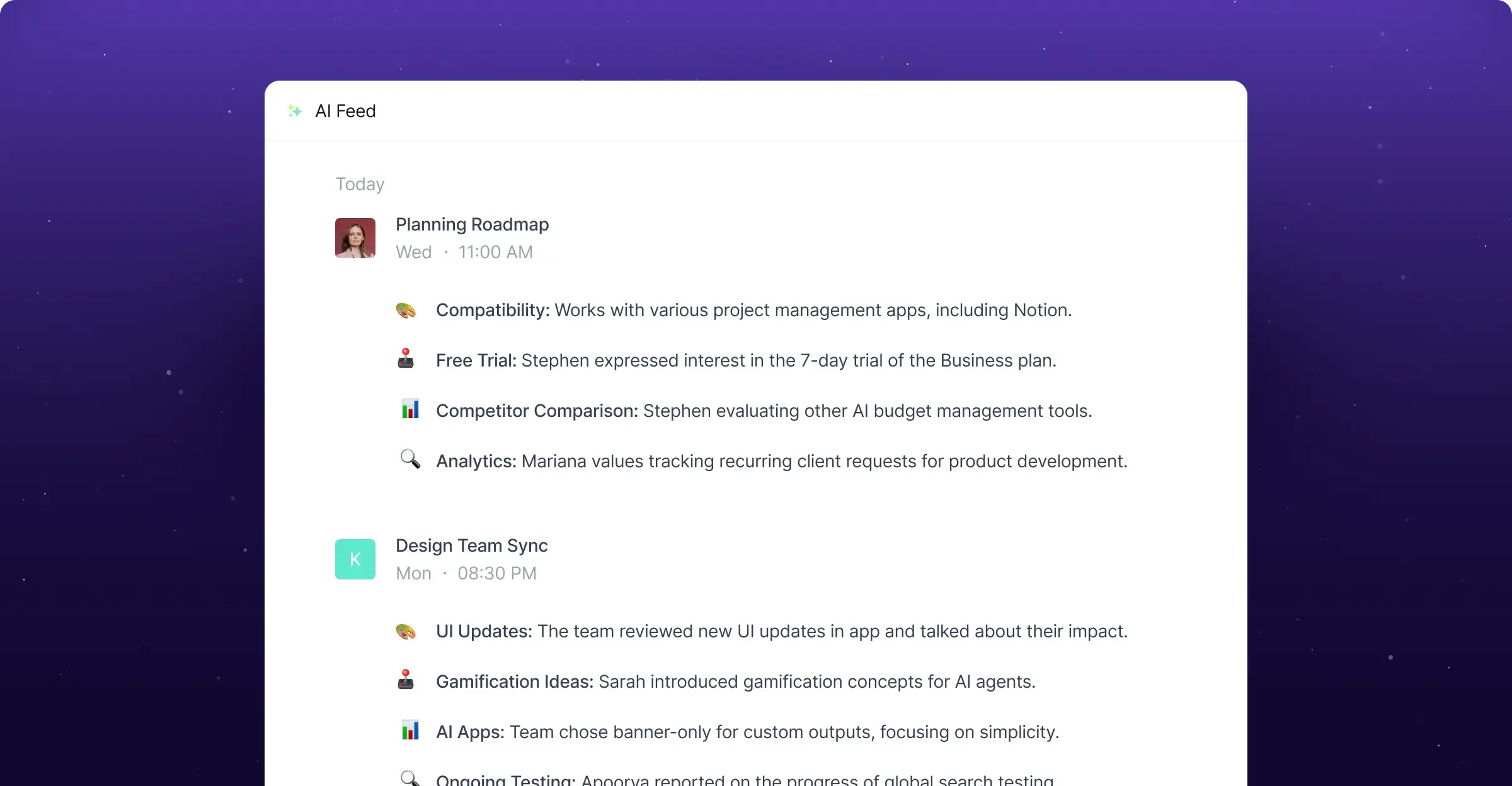
AI summaries: Every meeting gets an automatic structured note covering topics, decisions, questions and action items. Available on all plans — Free-tier users get 20 AI credits per month.
AskFred AI assistant: Natural-language search across all meeting transcripts. Questions like "When did we last discuss the pricing change?" return the exact quote with timestamp. Works across multiple meetings.
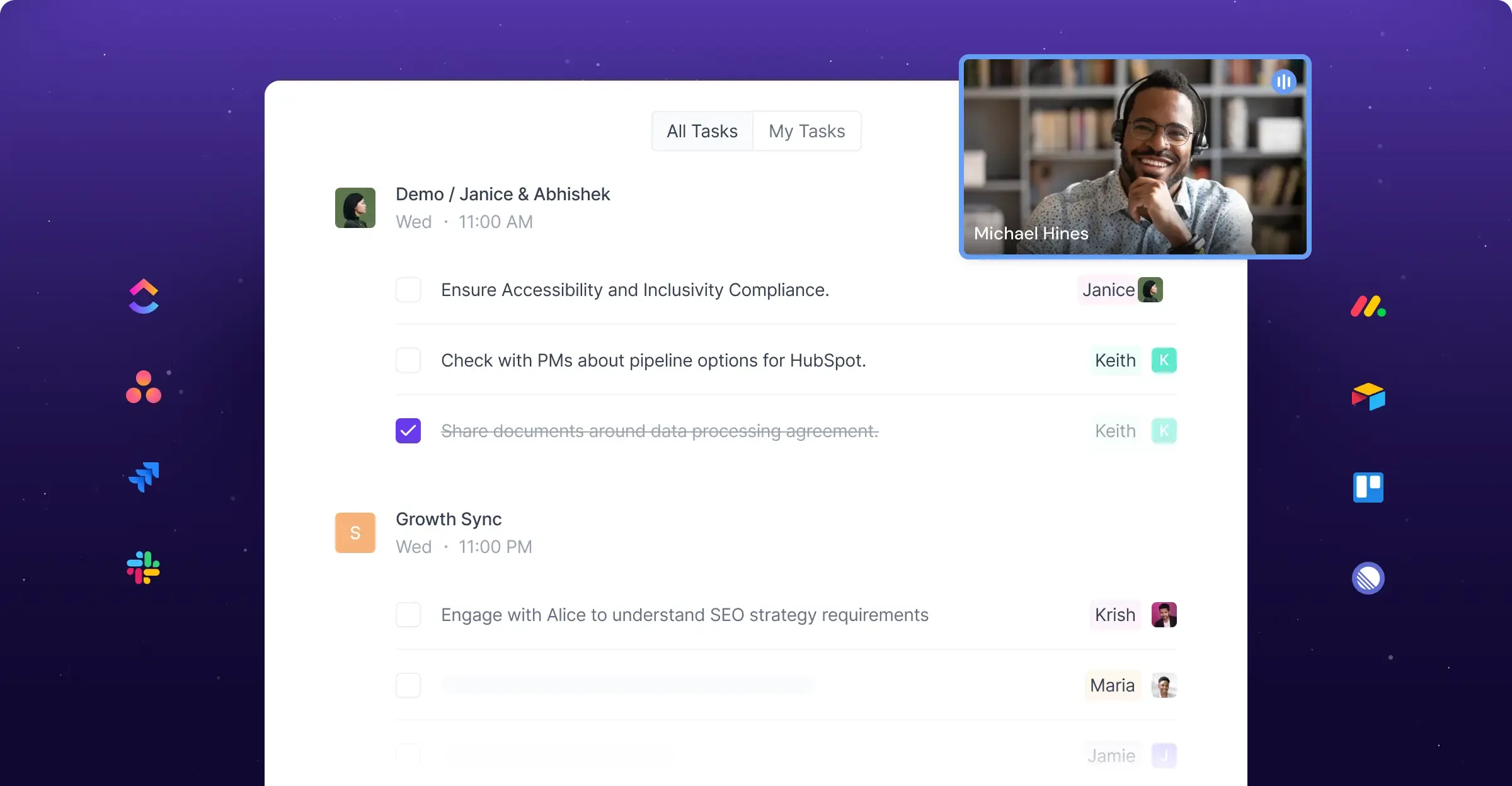
Action-item extraction: Tasks are detected automatically and can be pushed to Slack, Notion, Asana, Trello, Monday or ClickUp — including assignee and deadline when mentioned in conversation.
Sentiment analysis and Conversation Intelligence: On the Business plan, Fireflies detects sentiment (positive, neutral, negative), per-speaker talk-time, filler words and monologue length — useful for sales coaching and client-call reviews.
200+ integrations: Direct sync with HubSpot, Salesforce, Pipedrive, Zoho CRM, Slack, Microsoft Teams, Notion, Asana, ClickUp, Trello, Monday, Greenhouse and more. Zapier and webhooks for custom workflows.
Smart Search & Filter: Search by keyword, speaker, sentiment or custom tag across the full meeting database. Boolean operators supported.
Soundbites: Cut important meeting moments into 30-second audio or video clips and share via link — useful for briefings, stakeholder updates or async team reviews.
Mobile apps and Chrome extension: iOS and Android apps for on-the-go recording; Chrome extension for in-browser control.
Live Assist (launched November 2025): Real-time suggestions and coaching during live meetings (not only after the call), plus a standalone desktop app for capturing in-person conversations.
Video: "Try Fireflies AI Today" — a short demo of the full workflow from meeting capture to AskFred search. From the official @firefliesAi YouTube channel.
Who should use Fireflies?
The strongest fit is freelancers and small agencies whose work centers on client conversations — consultants, coaches, sales freelancers, agencies with stakeholder calls, and anyone running regular strategy or discovery meetings. Users with 1–2 short calls per week can stay on the Free plan indefinitely. Users with 5–10 meetings per week should upgrade to Pro — the Free storage cap (400 minutes per team) fills within a few weeks at that pace.
Fireflies is particularly strong for multilingual workflows: if you have an English client call in the morning and a German strategy session in the afternoon, both get transcribed accurately without manual model switching. This is a weak point in Otter.ai (6 languages) and a clear argument for Fireflies for international freelancers.
Sales freelancers and consultants with CRM pipelines benefit from direct HubSpot and Salesforce sync: meeting notes, action items and deal updates land in the contact record automatically — no more manual copy-paste. The Business plan adds Conversation Intelligence, useful for sales reviews and performance coaching.
Fireflies is a weaker fit for freelancers under strict GDPR or HIPAA constraints (public sector, healthcare) — hosting is primarily US-based. In that case Granola is the more conservative alternative.
Pros & Cons
Pros
- Forever-free plan with unlimited transcription
- Transcription in 100+ languages
- AskFred AI searches all transcripts
- 200+ integrations including HubSpot and Salesforce
- Automatic action items and summaries
Cons
- AI credits throttle usage at volume
- Free storage fills within weeks
- No dedicated EU hosting
Fireflies pricing 2026: what does each plan cost?
Fireflies offers four plans in 2026, all cheapest on annual billing. The amounts below are regular list prices as of June 2026, verified on the official pricing page. The full feature breakdown is in the pricing table further down.
Is Fireflies free?
Yes — permanently, and the free plan is more generous than most in this category: transcription and AI summaries are unlimited. No credit card, no expiry, every meeting platform included (Zoom, Meet, Teams, Webex), plus AskFred search and the mobile and desktop apps.
The limit is storage, not transcription — and that distinction is the whole point. You get 400 minutes of storage per team, which is roughly six or seven hours of recorded meetings in total, not per month. Transcribe as much as you like; once the stored archive fills up, you are choosing what to delete. For someone who reviews notes the same week and does not need a searchable back catalogue, that works indefinitely. For anyone who wants to look up what a client said four months ago, it does not.
The second limit is 20 AI credits, which govern AskFred and the AI features rather than transcription itself. Pro raises storage to 8,000 minutes per seat — a twentyfold jump, and the actual reason most people upgrade.
All plans use an AI credit system that governs AskFred, AI summaries and action items. Free has 20 credits/month; Pro/Business plans get a shared workspace pool (Pro: 20 one-time, Business: 30, Enterprise: 50) plus monthly refills. Heavy users can purchase add-on credit bundles (~$0.06–0.10/credit) — relevant for anyone using AskFred multiple times per day.
Pricing
Free
Free
forever free
- Unlimited transcription & AI summaries
- 400 storage minutes per team
- 20 AI credits per month
Pro
$10
/user/month (annual)
- Unlimited transcription
- 8,000 storage minutes per seat
- Smart search & filters
Business
$19
/user/month (annual)
- Unlimited storage
- Video recording
- Conversation Intelligence
Enterprise
$39
/user/month (annual)
- Everything in Business
- SSO & SAML
- Custom onboarding
Prices may change — check the official website for current plans.
Price history
Checked Sep 24, 2026 · 3 plans unchanged since Sep 14, 2026
Alternatives by use case
- tl;dv If recording is the priority
- Happy Scribe If European hosting is a condition
- Notion If handwritten notes fit better


Frequently Asked Questions
What is Fireflies.ai?
Fireflies.ai is an AI meeting assistant that automatically joins your online meetings (Zoom, Google Meet, Microsoft Teams, Webex), transcribes the conversation, generates a summary and extracts action items. The built-in AI assistant AskFred lets you search across all your meeting transcripts using natural-language questions — for example asking what a client said about budget in May — and returns the exact quote with speaker attribution and timestamp. Over 1 million teams use Fireflies, which holds 4.9/5 on Capterra and 4.7/5 on G2.
How much does Fireflies.ai cost in 2026?
Four plans, all cheapest on annual billing. The free tier transcribes without limit — what is capped is storage, and that is what decides the upgrade. The first paid tier multiplies it, the second adds video recording and CRM sync. A separate AI-credit system governs AskFred and the summaries.
Is Fireflies.ai free to use?
Yes — the Free plan is permanently free and includes unlimited transcription, AI summaries, AskFred search, action items, 20 monthly AI credits and 400 storage minutes per team. This is enough for serious testing and for occasional users to stay on long-term. With several meetings per week the 400-minute storage cap fills within a few weeks, at which point you either upgrade or delete older recordings. Video recording is not included on Free or Pro — it starts at the Business plan.
Which languages does Fireflies.ai support?
Fireflies transcribes in over 100 languages including English, German, French, Spanish, Italian, Portuguese, Dutch and all major European and Asian languages. Accuracy for clear English speech reaches 95%+. One limitation: Fireflies cannot transcribe multiple languages simultaneously within the same meeting — you select one language per meeting. For mixed-language calls, Otter.ai or tl;dv are more flexible.
Fireflies vs. Otter.ai — which is better?
Both are strong AI meeting assistants with different focuses. Fireflies wins on language support (100+ vs. 6 on Otter), integrations (200+ including HubSpot/Salesforce), and the AskFred AI search across all meetings. Otter.ai has a cleaner UX for pure live transcription and tighter Otter Pilot integration for English-speaking solo users. For multilingual freelancers and small agencies needing CRM sync, Fireflies is usually the better pick. See our Otter review for the full comparison.
Fireflies vs. tl;dv — which one should I pick?
tl;dv has a more generous free plan (unlimited recordings on Zoom/Meet/Teams) and a stronger video-highlight feature, but is less mature on CRM integration and multi-account setup. Fireflies offers deeper sales- and CRM-workflow integration, a more powerful AI search (AskFred) and a broader integration ecosystem. For pure sales reviews and async video sharing, tl;dv is strong; for CRM-driven consulting and agency workflows, Fireflies is the more robust choice. See our tl;dv review.
Is Fireflies.ai GDPR compliant?
Fireflies meets GDPR requirements and is SOC 2 Type II, HIPAA and GDPR certified per the vendor. However, Fireflies hosts primarily in the United States — there is no dedicated EU data center. For freelancers without strict data-residency requirements this is fine; for public-sector or healthcare clients with DPIA obligations, it can be a dealbreaker. In that case, EU-hosted alternatives such as Granola are the safer choice. Meeting attendance notifications (bot banner) are configurable in settings.
Verdict
Fireflies.ai is one of the strongest AI meeting assistants on the market in 2026 — especially for freelancers running heavy client, stakeholder or sales-lead call schedules. The combination of 100+ languages, AskFred AI search and 200+ integrations is unique in its competitive field. The Free plan is generous enough for serious evaluation (and sustainable long-term for occasional users); the Pro plan at $10/month is one of the best prices in the category. Pick Business if you need video recording or CRM sync. Caveats: the AI credit system on Free/Pro, no parallel multi-language transcription within one call, and no EU hosting. For freelancers with strict GDPR clients, Granola is the conservative alternative — for everyone else, Fireflies is the most productive AI meeting solution available in 2026.