Best AI Note Takers 2026: 8 Picks for Zoom, Teams, Meet and Bot-Free Calls
Fastlancer Team · Updated: Nov 18, 2026
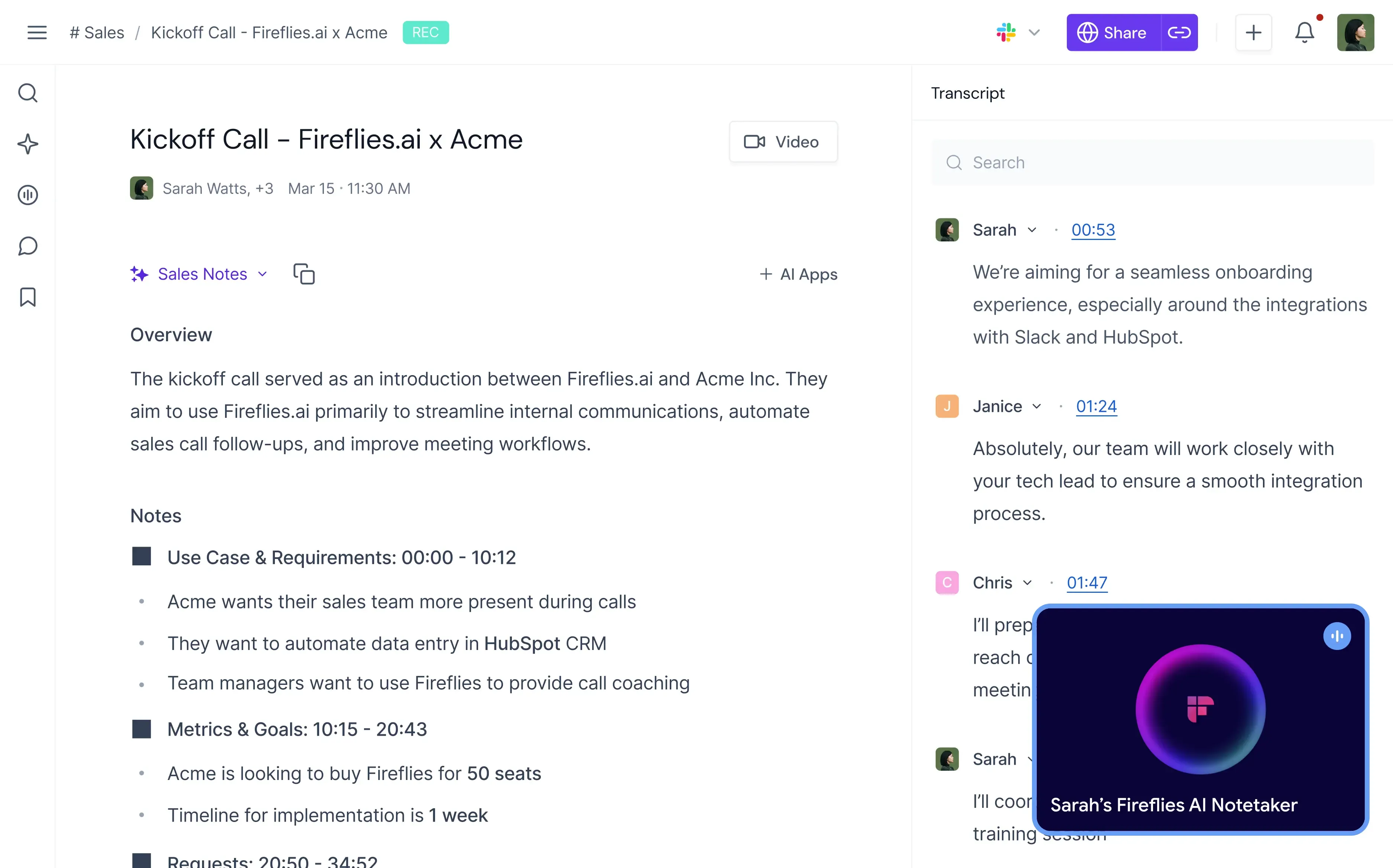
An AI note taker listens to the call so you do not have to type. When it ends, you have the transcript, a summary and the action items with names attached, ready for the follow-up email or the project tool.
For a freelancer or a small team, three questions decide the pick: where your calls happen (Zoom, Teams, Google Meet or in the room), whether a bot may join a client call, and how far the free plan reaches. This guide sorts eight tools by exactly those three questions.
Which note taker fits which kind of call
-
Every call on Zoom, Teams or Meet transcribed, with tasks pulled out and searchable later.
Jump to the tool -
A free plan with unlimited recordings, and a choice between bot and bot-free per call.
Jump to the tool -
No bot at all: it hears the call through your computer and turns your rough notes into clean ones.
Jump to the tool -
A live transcript you can read and highlight while the conversation is still running.
Jump to the tool -
Meeting notes plus files: interviews, voice memos and videos that need subtitles.
Jump to the tool -
Clients who ask where the recording lives: EU or US data storage on every plan.
Jump to the tool
Two more for narrower cases: Notta for calls in two languages, and Bluedot for recording straight from the Chrome tab.
AI note takers compared: free plan, price and bot-free capture
All eight record Zoom, Microsoft Teams and Google Meet calls. The differences sit in the free plan, in how the tool gets into the call and in the languages it handles.
| Tool | Free plan | Paid from | Without a bot | Languages |
|---|---|---|---|---|
| Fireflies.ai | Unlimited transcription, 400 min storage per team, limited AI summaries | $10/ | Desktop app | 100+ |
| tl;dv | Unlimited recordings, AI notes for 10 meetings, history up to 3 months | $18/ | Desktop app | 100+ |
| Granola | AI notes, 30-day meeting history | $14/ | Always, no bot exists | Multi-language |
| Otter.ai | 300 min/ | $8.33/ | Desktop app | English, Spanish, French, Japanese; more rolling out |
| Happy Scribe | Unlimited recordings up to 45 min each, 30-day history, 10 min file transcription | $8.50/ | Phone app and web recorder | 150+ |
| MeetGeek | 3 hours of transcription/ | $9.99/ | Yes, every plan | 100+ |
| Notta | 120 min/ | $8.17/ | Desktop app | 58 |
| Bluedot | 5 meetings in total | $14/ | Chrome extension, desktop app | 100+ |
Prices in USD, billed annually. Month-to-month billing costs more; at Otter and Happy Scribe it is about double.
 Fireflies.ai
- Best for
- Freelancers and small teams who want every call transcribed and searchable
- Free plan
- Unlimited transcription, 400 minutes of storage per team, limited AI summaries
- Pricing
- Pro from $10 per seat a month, billed annually
- Watch out for
- The storage cap fills after a few long calls
Fireflies joins Zoom, Teams and Meet as a bot or records through the desktop app, then pulls tasks and questions out of the transcript. Unlimited AI summaries start on Pro, which is where most regular users end up.
 tl;dv
- Best for
- Small teams that record many calls and want to start free
- Free plan
- Unlimited recordings and transcripts, AI notes for 10 meetings
- Pricing
- Pro from $18 per seat a month, billed annually
- Watch out for
- Free recordings are kept for up to three months
tl;dv records as a bot or bot-free through its desktop app, and the mobile app covers calls on the phone. The company is European and hosts its data in European data centers, which matters to clients in the UK and EU.
 Granola

- Best for
- Client calls where a bot in the participant list would feel wrong
- Free plan
- AI meeting notes with 30 days of history
- Pricing
- Business $14 per user a month
- Watch out for
- Audio is deleted after transcription, so there is no recording to replay
You start Granola yourself, it listens through the computer on Mac or Windows, and it expands the notes you jot down into a full summary. That makes it independent of the meeting app, and the phone apps cover meetings in the room.
 Otter.ai

- Best for
- English-language calls where you want to read along live
- Free plan
- 300 minutes a month, up to 30 minutes per conversation
- Pricing
- Pro from $8.33 per user a month, billed annually
- Watch out for
- Fewer languages than the rest of this list
Otter shows the transcript while people are still talking, and its desktop app for Mac and Windows records without a bot. On the free plan, the cap per conversation ends most client calls early.
 Happy Scribe
- Best for
- Interviews, recorded files and videos that also need subtitles
- Free plan
- Unlimited meeting recordings up to 45 minutes each, 10 minutes of file transcription
- Pricing
- Basic from $8.50 a month, billed annually
- Watch out for
- Uploaded files run on a separate, tighter minute budget
Happy Scribe sends a note taker into Zoom, Meet and Teams and records in person through the phone app, in more than 150 languages. The same account turns uploaded audio and video into transcripts and subtitles.
 MeetGeek
- Best for
- Small teams that need a say in where meeting data is stored
- Free plan
- 3 hours of transcription a month, bot-free recording included
- Pricing
- Pro from $9.99 per user a month, billed annually
- Watch out for
- Three free hours cover only a few longer calls
MeetGeek records as a bot or bot-free and offers EU or US data storage on every plan, including the free one. Pro adds CRM sync with HubSpot, Salesforce and Pipedrive.
 Notta
- Best for
- Calls that switch between two languages
- Free plan
- 120 minutes a month, but only 3 minutes per conversation
- Pricing
- Pro from $8.17 a month, billed annually
- Watch out for
- Bilingual transcription is a paid add-on
Notta's desktop app for Mac and Windows records without a bot and transcribes in 58 languages. The free plan works as a demo, so judge Notta on its seven-day Business trial rather than on the free tier.
 Bluedot
- Best for
- Browser-based calls recorded from the Chrome tab
- Free plan
- 5 meetings in total
- Pricing
- Basic from $14 per user a month, billed annually (audio only)
- Watch out for
- Basic caps each recording at one hour
Bluedot's Chrome extension and desktop app record without a bot, and an optional chat message tells participants that notes are running. You pay only for people who record, not for everyone in the workspace.
Bot or no bot: what changes on a client call
A bot joins the call as its own participant. Everyone sees it, it can record a meeting you are not attending, and it captures video. Some clients find the extra name odd, and some company accounts block outside bots altogether.
Bot-free recording captures the audio on your own device. Nothing shows up in the participant list, which keeps a sales or discovery call natural, but it also means nobody knows unless you say so. Fireflies and Bluedot can post a notice in the chat; with the other tools, that sentence is yours to say.
For meetings in the room, the phone apps of Otter, tl;dv, Granola, Happy Scribe and MeetGeek do the job. If you record a lot of in-person conversations, a dedicated recorder like Plaud sits on the table or clips to the phone and comes with a free starter plan for transcription.
Two related tools solve neighbouring problems: Krisp removes background noise on calls and also writes meeting notes, and Castmagic turns recordings into posts and newsletters rather than minutes. Sales platforms like Gong or Avoma are built for sales teams from around ten seats and are overkill for a solo seller.
When the free plan is enough
If you have a few client calls a week and mainly need to remember what was agreed, a free plan carries you. tl;dv and Happy Scribe record without a monthly cap on the number of calls, Fireflies transcribes without limit, and Granola costs nothing if you take notes anyway and never need to replay the audio.
Upgrade when one of three things runs out: the AI notes (tl;dv after ten meetings, Fireflies with limited summaries), the call length (Otter and Happy Scribe cut off longer calls) or the history (30 days at Granola and Happy Scribe, three months at tl;dv). CRM sync and team workspaces are paid features everywhere.
For the rest of the stack around your calls, see the best freelancer tools guide; for the meeting software itself, our Zoom review.
Frequently Asked Questions
What does an AI note taker actually do for a freelancer?
It takes over the typing. The tool records or listens to the call, writes the transcript, and turns it into a summary with decisions and action items. You stay in the conversation with the client, and the follow-up email or task list is drafted before you close the laptop. Most tools also let you search past calls, which helps when a client asks what was agreed three weeks ago.
What is the best AI note taker for Zoom, Teams and Google Meet?
Fireflies is the most complete all-rounder for all three platforms: unlimited transcription even on the free plan, task extraction and search across every call. If you want more free AI notes or recordings that stay available for longer, tl;dv is the stronger free start. If no bot may join, Granola listens through your computer instead and works with any meeting app.
Is there a free AI note taker that is actually usable?
Yes. tl;dv records an unlimited number of calls for free and writes AI notes for a limited number of them. Happy Scribe records meetings for free up to a fixed length per call, and Fireflies transcribes without limit but caps storage and AI summaries. Notta and Bluedot are better seen as trials: Notta stops after a few minutes per conversation, Bluedot after a handful of meetings in total. The comparison table has the exact limits.
Can I use an AI note taker without a bot joining the call?
Yes. Granola works only that way: it captures the audio on your computer, so nothing appears in the participant list. Fireflies, tl;dv, Otter and Notta offer the same through a desktop app, Bluedot through a Chrome extension, and MeetGeek offers bot-free recording on every plan. The trade-off: without a bot, nobody sees that the call is being transcribed, so telling people is up to you.
Do I need permission to record a client call with an AI note taker?
Recording rules differ by US state and by country, and some require every participant to agree. The safe habit is the same everywhere: say at the start of the call that a note taker is running, mention it in the invite, and offer to switch it off. Several tools help with this, from a visible bot to an automatic chat message when recording starts. For a binding answer in your situation, ask a lawyer.