Castmagic Review 2026: Turn Audio and Video into Content with AI
Tim Wittke · Updated: Sep 5, 2026
Short verdict
Ideal for
- Podcasters who want show notes, quotes and social posts from every episode
- Content creators and video teams repurposing long-form recordings across channels
- Solo freelancers and agencies scaling repurposing without a content team
- Anyone transcribing mostly English audio and reworking it into written assets
Not ideal for
- Anyone who needs to edit video rather than derive text
- Creators with few recordings a month — the hour cap does not pay off
- People who want a permanently free option
- Entry price
- From $19 / month
- Free to start?
- No permanent free plan; a time-limited trial has appeared only intermittently
- Stands out for
- Turns a single audio or video file into dozens of finished content assets — show notes, transcript, blog post, newsletter and social posts in one pass
What is Castmagic?
Castmagic is an AI tool for content repurposing: you upload a podcast episode, a video or a plain audio file, and the AI produces a whole bundle of finished content in one pass — transcript, show notes, summary, blog post, newsletter copy and a batch of social-media posts. The promise is simple: turn an hour of talking into dozens of written assets without staffing an editorial team.
How Castmagic works
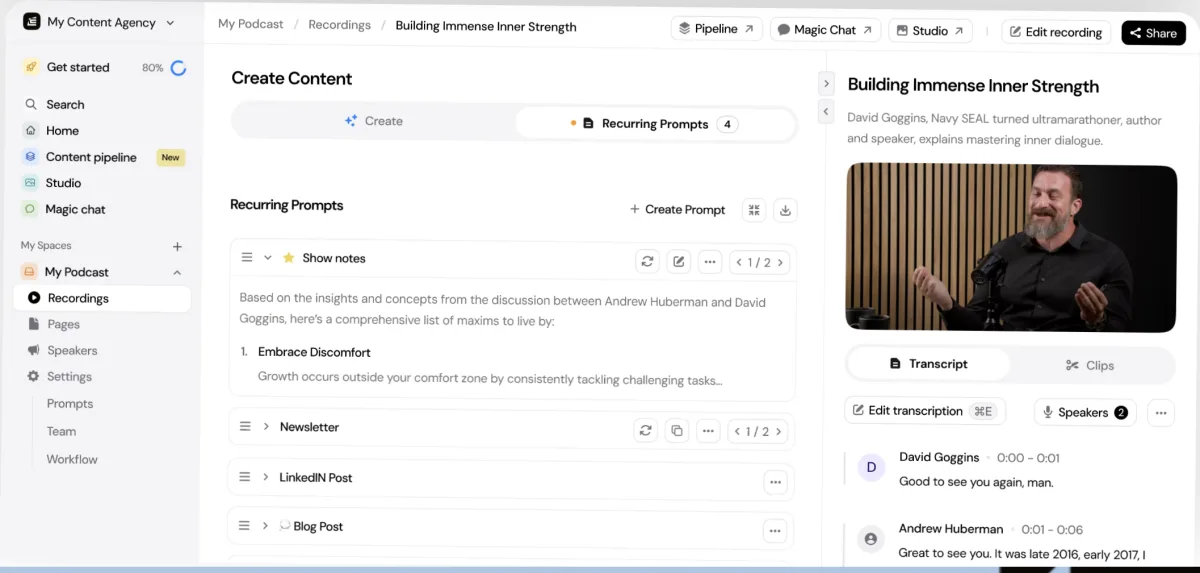
After upload, Castmagic transcribes the recording and runs it through prepared prompt templates. Every output can be re-generated without limit and shaped with your own prompts to match your voice. Magic Chat lets you ask the transcript questions directly, pull quotes or condense long passages. For social, the tool also generates clips and audiograms. Outputs are organized into "spaces" so multiple projects or clients stay separate.
Pricing and hour allowances
Castmagic bills in US dollars and tiers by transcribed hours as a library total; you can buy more at any time. The entry plan covers a weekly podcast, the second adds API access, the third priority support and unlimited seats at a per-person surcharge.
The limit is hours, not the number of assets. Push a lot of raw audio through and you climb tiers faster than the plan names suggest. Annual billing saves about 30 % against paying monthly.
Castmagic or Descript?
The most common mix-up: Castmagic is not a video editor. Descript cuts audio and video by editing the transcript, strips filler words and exports the finished episode. Castmagic picks up afterward — it takes the finished recording and turns it into as much text as possible. If you need both, edit in Descript and repurpose in Castmagic. If only one of those jobs is on the table, it decides the pick.
Who Castmagic is worth it for
Castmagic pays off once publishing becomes routine: weekly podcasts, regular YouTube videos, course recordings or agency content across several clients. The editorial time you save quickly covers the subscription. For a few recordings a year, or for dense non-English content that needs heavy proofing, the plan is oversized — find more repurposing tools in our marketing tools overview.
What we like about Castmagic and what we don't
Pros
- One file becomes dozens of content assets
- Unlimited re-generations with custom prompts
- Magic Chat for querying transcripts directly
- 60+ languages plus clip and audiogram creation
- Clear hour allowances instead of credit math
Cons
- Hour cap can inflate costs fast
- No permanent free plan
- No video-editing timeline like Descript
Pricing
Hobby
$19
per month billed annually ($239/yr) · 30 transcription hours (library total), 3 spaces, 50GB
- AI chat, custom prompts, unlimited re-generations
- Unlimited clip and audiogram creation
- Up to 3 team seats
Starter
$48
per month billed annually ($579/yr) · 100 hours (library total), 10 spaces, 250GB
- Everything in Hobby plus API access
- Up to 5 team seats
- Onboarding call included
Team
$139
per month billed annually ($1,669/yr) · 400 hours (library total), 25 spaces, 1TB
- Priority support
- 5 seats included, extra seats $159/yr ($19 monthly)
- For studios and high-output teams
Business & Scale
from $699
per month · custom volume, SLA and enterprise support
- Custom transcription volume, seats and storage
- Volume discounts and a dedicated contact
- For platforms and publishing houses
Prices may change — check the official website for current plans.
Price history
Checked Oct 23, 2026 · 1 change since Aug 31, 2026
- Sep 25, 2026New plan “Business & Scale” ($999)
Alternatives by use case


Frequently Asked Questions
How much does Castmagic cost?
Castmagic bills in US dollars and tiers by transcribed hours, not by the number of assets. Push a lot of raw audio through and you climb tiers faster than the plan names suggest. Hours can be topped up at any time, and annual billing saves about 30 %.
Is there a free version of Castmagic?
There is no permanent free plan. Castmagic has offered a limited trial at times, but it is not consistently listed on the pricing page — the cheapest fixed entry point is the Hobby plan at $19/month billed annually. If you only need to process the odd file, check the current trial status on castmagic.io before you commit.
Castmagic vs Descript — which one fits?
They solve different problems. Castmagic specializes in content repurposing: one recording becomes show notes, articles, newsletters and social posts. Descript is a full audio and video editor where you cut by editing the transcript, remove filler words and export. Rule of thumb: if you need to edit finished videos and podcast episodes, use Descript; if you want to squeeze the most written assets out of an existing recording, Castmagic is faster. Plenty of teams run both side by side.
What formats and languages does Castmagic support?
Castmagic handles common audio and video files plus recording uploads, and supports 60+ languages for transcription and output. Output quality is strongest in English; other languages transcribe fine but usually need a proofreading pass on technical terms.
Who is Castmagic worth it for?
Anyone who produces long-form audio or video on a schedule — podcasters, YouTubers, course creators and content agencies. If you publish several episodes a week, the automatic repurposing saves hours of editorial work. For a handful of recordings a year the subscription is too expensive; a pay-as-you-go transcription service fits better there.
Verdict
Castmagic is a time-saver for anyone who talks for a living and wants the writing handled: feed in a recording and minutes later you have show notes, a transcript, a blog post, a newsletter and a stack of social posts — all re-generatable and refinable by chat. The limits are clear: USD-only pricing, an hour cap that becomes the real cost driver for frequent publishers, and no video editing like Descript. If you publish podcasts or videos every week and want the surrounding content automated, it pays for itself quickly. For occasional recordings, the subscription is overkill.