CapCut Review 2026: Video Editor for Reels, Shorts and Product Clips
Fastlancer Team · Updated: Nov 18, 2026

Short verdict
Social clips with captions in minutes, not hours
- Freelancers and small business owners who cut their own Reels, Shorts and TikToks without learning a pro editor
- Anyone tired of typing captions by hand or reformatting one video for every platform
- People who start an edit on the laptop and finish it on the phone with the same account
- Brands that want to run ads with CapCut library music on Instagram, YouTube or their own website
- Teams handling confidential client footage that must not leave their own systems
What CapCut does for freelancers and small businesses
Short videos have become part of the marketing job for most freelancers and small businesses, and editing them can easily eat half a workday. CapCut shortens exactly that part: drop in your raw footage, trim it to length, generate captions, add music and export for vertical or horizontal feeds. It works on desktop, in the browser and in the mobile app with one account.
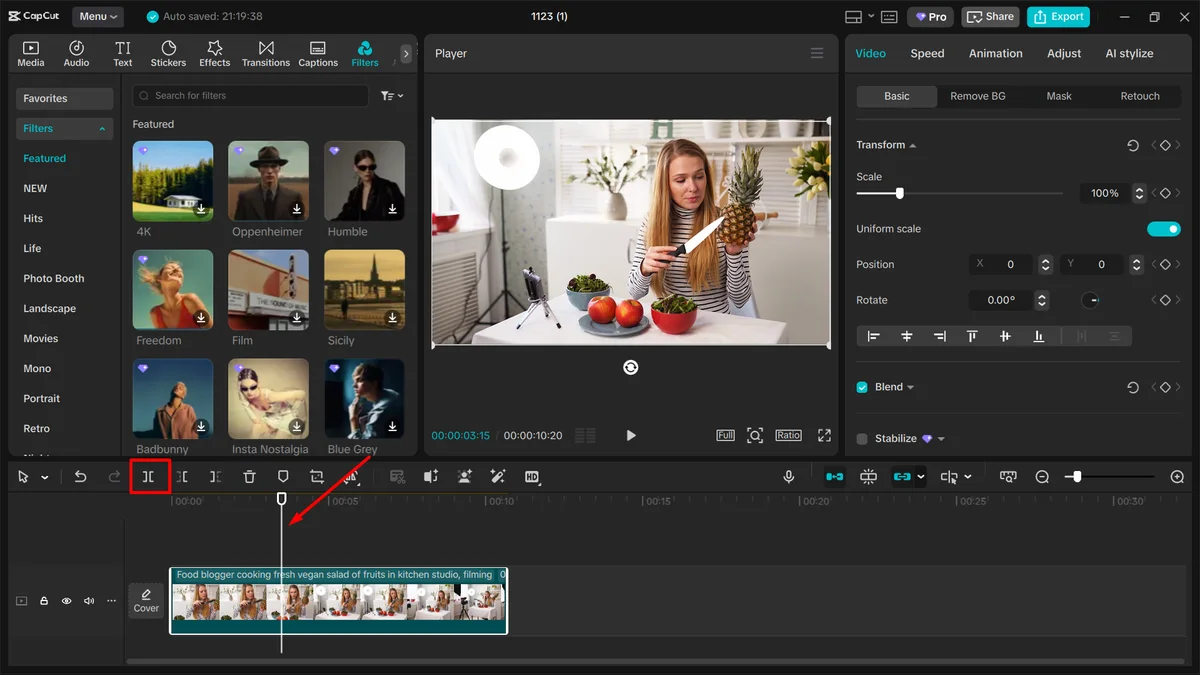
The layout follows classic editing software but is tuned for short formats. Instead of color grading and multicam, the focus is on templates, transitions, text styles and stickers. If you have never edited a video, a template gets you to a first result; if you want more control, you work straight on the timeline. CapCut is not built for a long brand film shot on several cameras, but it is very good at the weekly social clip.
Free or Pro: how to tell inside the editor
The free plan covers basic editing. Auto captions work like this: pick the spoken language, hit Generate, check the text. Whether they're fully usable without a subscription depends on version and feature, according to CapCut's help center, so plan on Pro if you caption regularly. Many extras carry a diamond icon and belong to Pro, such as bilingual captions, highlighted keywords or filler-word detection. The same goes for part of the effects, filters, templates and music.
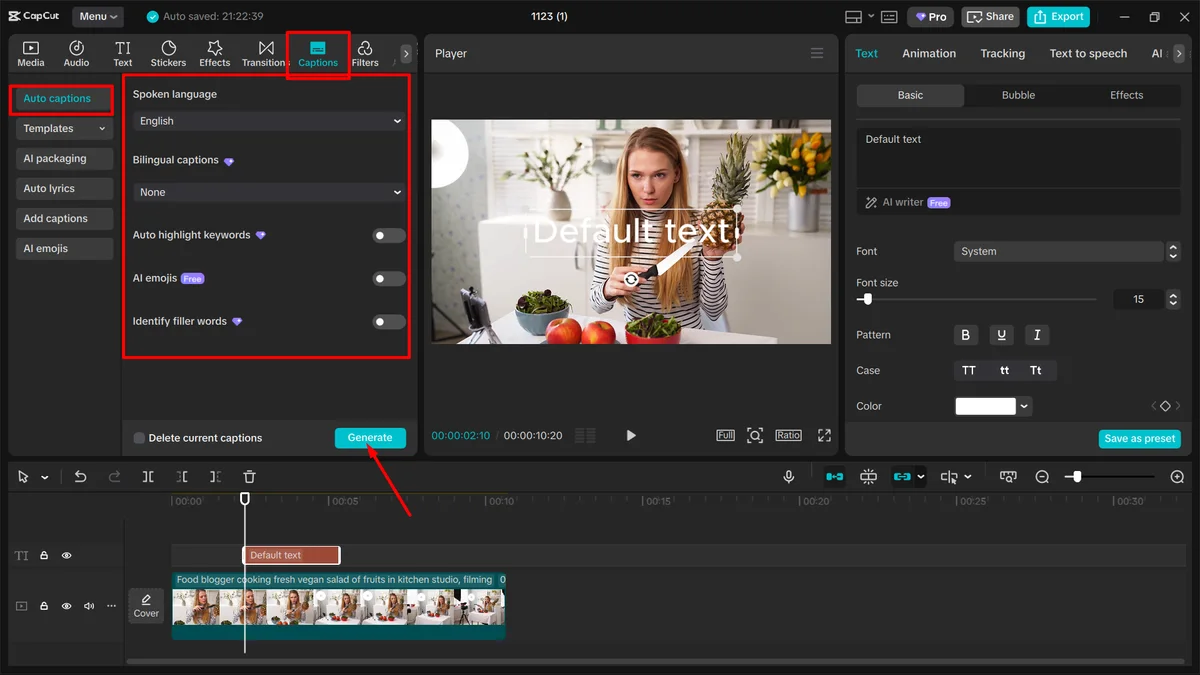
The practical point: if even one diamond element sits in your project, CapCut will not export until you remove it or subscribe. Check every track before exporting, including text, effects and audio. On the free plan, a watermark usually only shows up through templates that append a CapCut outro; just delete that clip.
CapCut pricing: Pro is enough for most
The tiers come down to two questions: do you need the diamond features, and do you generate video with AI? For editing, effects and premium templates, Pro is enough. Ultra mainly buys more AI credits for video generation. Teams only pays off when several people share one brand kit.
Three traps the cards cannot show: once your subscription ends, projects with Pro elements can no longer be exported. Assets that launch as free can later move to Pro. And if you subscribe through the App Store or Google Play, you see different plans there and cancel there, not with CapCut.
Commercial use: watch the music and templates
Your own footage is yours, but material from CapCut comes with its own license. Songs from the regular music library are cleared for personal, non-commercial videos only. As soon as a clip promotes a brand, an offer or your business, you need tracks from the Commercial Sounds library or rights of your own.
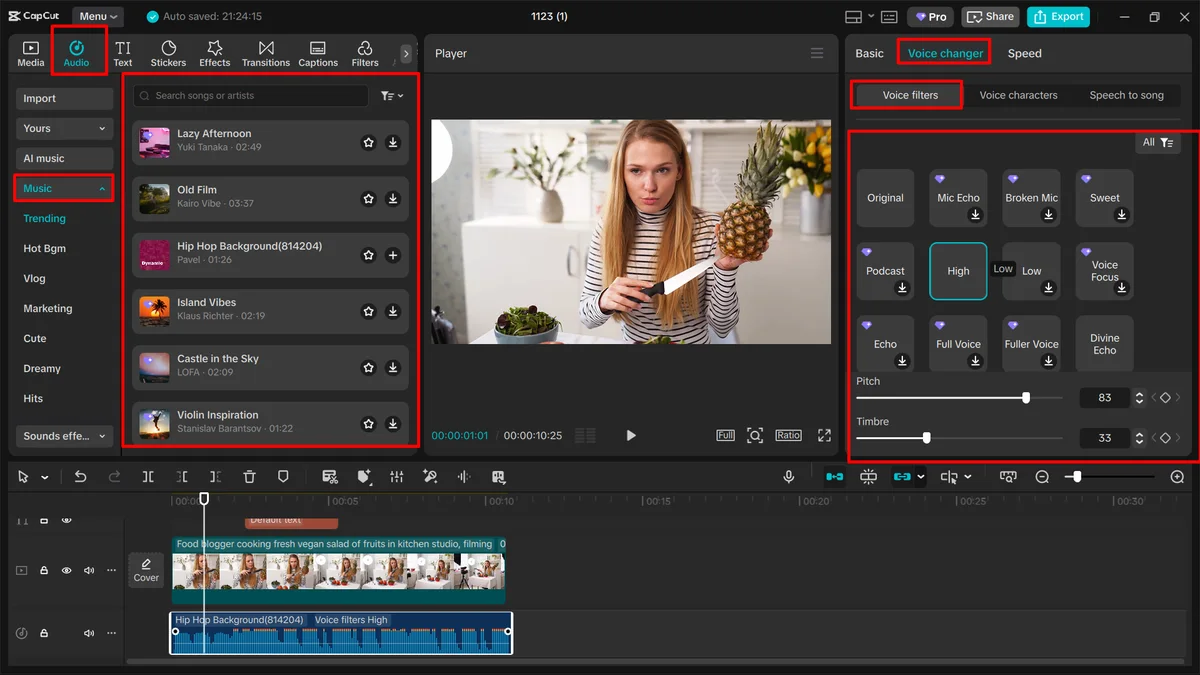
Commercial Sounds have limits too: under the Materials License Agreement you may only show them on CapCut, TikTok and TikTok for Business. Instagram, YouTube or your own site need a separate license. Templates, effects and stickers follow the same idea: only items labeled commercial are allowed in ads, and mixing them with unlabeled items makes the whole video personal-use only. The license also rules out ads for supplements, health or personal hygiene products, even with cleared material.
Privacy and rights to your videos
In mid-2025 a terms update caused an uproar over the broad license CapCut takes on uploaded content. CapCut said the wording had been there before. The core still applies in the current US terms: you keep ownership, but the operator and its partners may use your content worldwide, perpetually and with the right to sublicense, to run and develop the service. There is also a license to your username and likeness to credit you as the source, including in sponsored content.
For US users, CapCut is now run by TikTok USDS Joint Venture LLC rather than directly by ByteDance. For promo clips featuring you, your products and stock footage, that is a reasonable trade. Client footage under NDA or recordings of employees are better edited in software that works locally.
What we like about CapCut and what we don't
Pros
- Auto captions in many languages
- Desktop, browser and mobile, one account
- Generous free plan for simple edits
- Lots of templates built for social formats
Cons
- AI video limited by monthly credits
- Prices differ by store and country
- Teams plan starts at two seats
For most of the social video a small business produces, CapCut is one of the fastest tools around, as long as you keep licensing and privacy in mind. More editing and animation tools are in our overview of video and animation tools.
Pricing
Free
$0
- Edit on desktop, in the browser and on mobile
- Core cutting and formatting tools
- Free templates and assets
Pro
$19.99 / month
- All Pro features, effects and premium templates
- 1,200 AI credits a month, more available to buy
- 1 TB cloud storage
Ultra
$79 / month
- Everything in Pro plus exclusive AI features
- 8,645 AI credits a month for AI video
- 1 TB cloud storage
Teams
$12.49 / user / month
- From 2 seats, Pro features for everyone
- 1,200 AI credits per seat a month
- Shared brand kit with logos and colors
Prices may change — check the official website for current plans.
Alternatives by use case


Frequently Asked Questions
CapCut or Descript: which one fits my work?
Both take the grind out of video editing, just in different places. CapCut is built for short, fast social clips: templates, effects, caption styles and formats for Reels, Shorts and TikTok. Descript edits video and audio through the transcript like a text document, which suits interviews, podcasts and explainers with a lot of talking. If you mostly produce short clips with music and effects, pick CapCut; if you talk a lot and animate little, read our Descript review.
How much is CapCut Pro?
Pro covers most freelancers: it unlocks every feature and asset marked with a diamond and adds a monthly pool of AI credits. Ultra only makes sense if you generate AI video regularly and burn through credits. Teams is billed per seat and pays off once several people work from the same brand kit. Paying yearly saves about 25% on Pro. Prices and plans in the App Store and Google Play can differ, and the apps also sell a cheaper Standard plan with fewer features. Current amounts are in the pricing cards, checked November 2026.
Is CapCut free without a watermark?
Yes, the free plan is permanent and exports without a watermark. A CapCut logo usually only appears when a template adds a branded outro clip at the end; delete that clip from the timeline before exporting. If your project contains any diamond-marked element, such as a Pro feature, effect or song, CapCut blocks the export until you remove it or subscribe. You can try Pro free for seven days first.
Can I use CapCut videos for ads and client work?
Your own footage is yours to use. Anything you pull from CapCut falls under the CapCut Materials License Agreement: songs from the regular music library are cleared for personal, non-commercial videos only. The Commercial Sounds library is cleared for business use, but only on CapCut, TikTok and TikTok for Business. Templates, effects and stickers are only allowed in ads if they carry a commercial-use label. For Instagram, YouTube or your website, use your own music or tracks licensed elsewhere.
Is CapCut still available in the US, and is it safe to use?
Yes. After a brief shutdown in January 2025, CapCut returned to US app stores, and since January 2026 US users have a contract with TikTok USDS Joint Venture LLC, the company set up under the TikTok divestiture law, in which ByteDance keeps a minority stake. The US terms of service and privacy policy were last updated in April 2026. Uploading still grants the operator a perpetual, worldwide, sublicensable license to use your content to run and develop the service, while you keep ownership. Keep confidential client footage out of it.
Verdict
CapCut takes the time-consuming part of social video off a freelancer's or small team's plate: cutting, captioning and getting every clip into the right format. The free plan covers simple edits and is a good way to learn the workflow. Pro is worth it once you use effects, premium templates or AI features every week and publish new clips on a schedule. For long brand films or interview-heavy content there are better-suited tools, but for short social formats CapCut is one of the fastest routes from raw footage to a finished Reel.