Cal ID Review 2026: Scheduling with Booking Links, WhatsApp Reminders and Payments
Fastlancer Team · Updated: Oct 7, 2026
Short verdict
Ideal for
- Solo freelancers who want a booking link without ever paying for it
- Small teams that want incoming requests routed to the right person automatically
- Consultants and coaches whose clients answer WhatsApp but ignore email
- Anyone selling paid consultations who refuses to hand over a cut of each booking
Not ideal for
- Anyone who needs a mature platform with years of integrations and community answers behind it
- Teams that need SSO and audit logs without moving to the Enterprise plan
- Anyone who needs a provider with a published EU data location
- Entry price
- Free plan · paid from $5 / month
- Free to start?
- Yes — Business plan for 14 days, no card required
- Stands out for
- A booking link that stays free for one person — and a team plan that bundles round-robin, routing forms and WhatsApp reminders at a fraction of the Calendly Teams price.
What Cal ID is
Cal ID is a scheduler in the mould Calendly made familiar: you define event types with a duration and availability, connect your calendar, and send a link that lets clients pick a slot themselves. What sets it apart are two decisions by the maker. First, the plan for one person stays free for good, with no ceiling on event types or bookings. Second, the team plan bundles features other vendors reserve for a higher tier: round-robin, routing forms and reminders over WhatsApp.
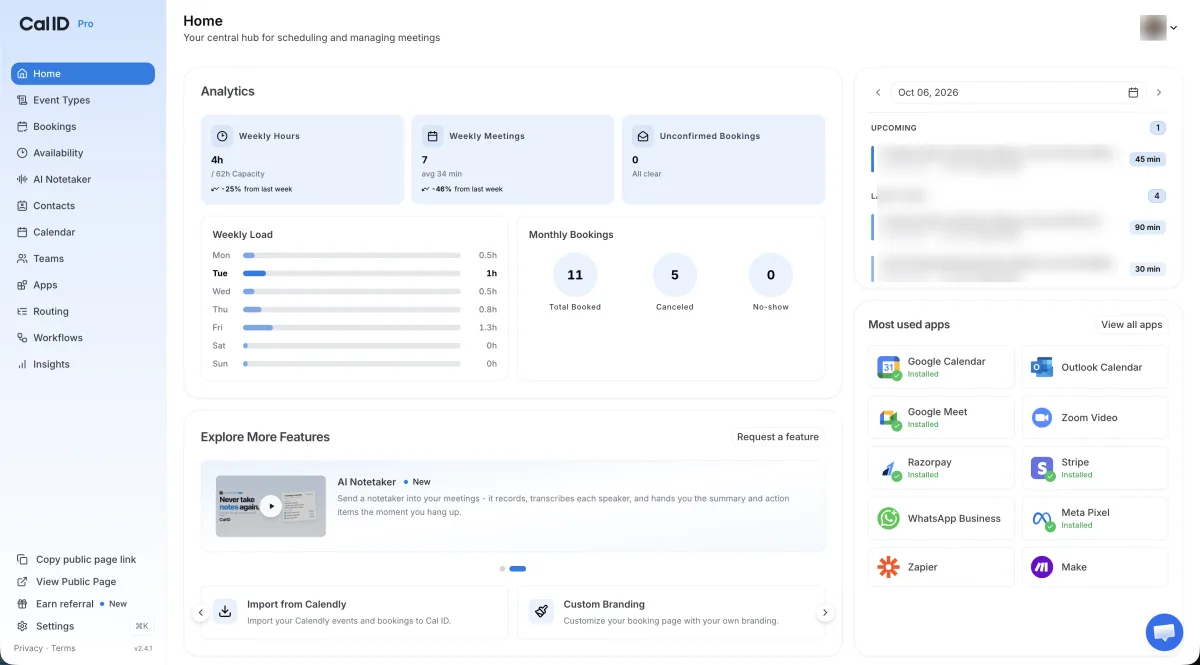
It connects to the usual calendars (Google, Outlook) and video tools (Zoom, Google Meet), plus Zapier and Make for automation — Slack is not a direct integration but reachable through either of those. Visitors see your availability in their own time zone, which removes the most common booking mistake when clients sit in other countries. Teams get a booking page per member and centrally managed event types, so an admin sets the rules once for everyone.
Reminders: the part that saves the meeting
A scheduler earns its keep not when the meeting is booked but when the person turns up. Cal ID handles that with workflows that send messages at points you choose — right after booking, or a set interval before the meeting. The channel is yours to choose: email, SMS or WhatsApp. For consumer clients and small businesses the last one is the channel that actually gets read, and on discovery calls with a high no-show rate that is the difference between a full calendar and a half-empty one.
Workflows apply per event type, so a free intro call can run different reminders from a paid consultation. On the free plan email reminders are unlimited while SMS and WhatsApp are capped; Business removes the cap. Cancel and reschedule links drop into the message as placeholders, so the recipient never has to hunt for them.
Teams: round-robin and routing forms
As soon as more than one person takes meetings, the question becomes who gets which. Cal ID answers it two ways. Round-robin distributes incoming bookings in rotation or by availability, so nobody is swamped and nobody sits idle. Routing forms go a step further: the visitor answers a few questions first, and the form sends them to the right person or booking page — sales to sales, support to support, the big account to the founder.
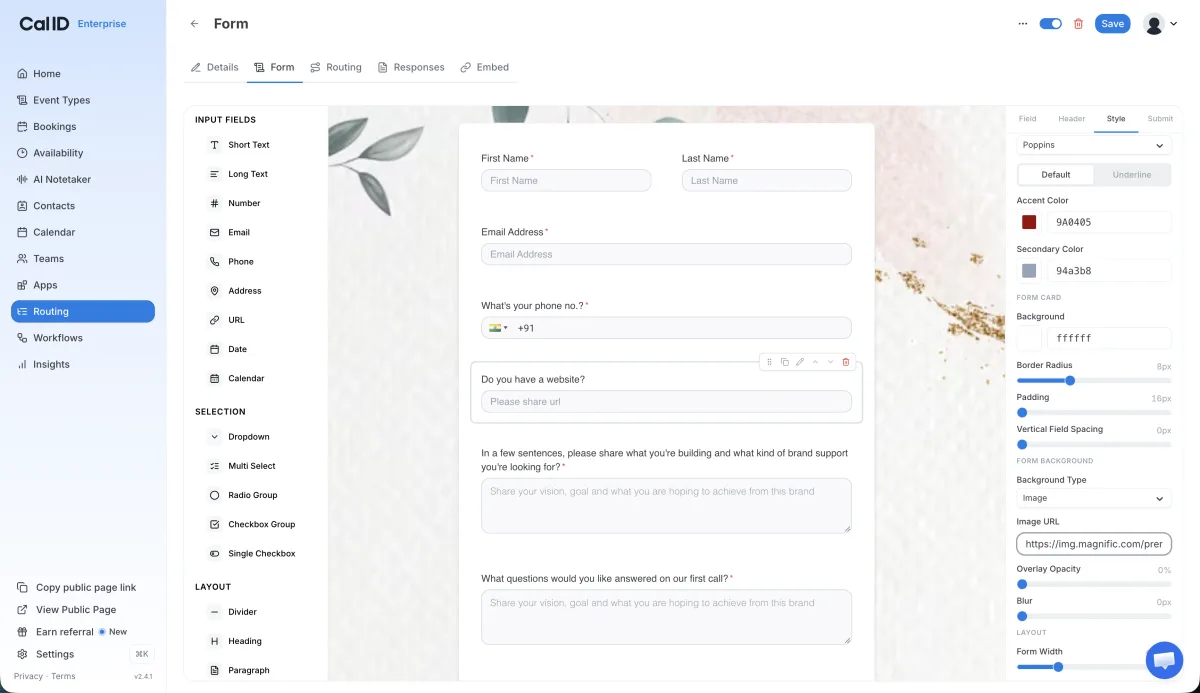
Both sit in the Business plan, together with collective scheduling for meetings that need several team members available at once. This is where the Calendly comparison gets interesting: there, the same features are spread across two tiers — round-robin, routing and managed events only arrive with the Teams plan, which on annual billing costs more than three times as much.
Paid bookings with no commission
If you sell discovery calls, consulting hours or workshops, payment can sit inside the booking itself. Cal ID connects Stripe, PayPal and Razorpay and keeps nothing for itself — only the processor's own fees apply. That sounds like fine print, but with schedulers that charge a transaction fee it is exactly the line that adds up over a year. For US and UK users Stripe is the obvious route; Razorpay is an Indian processor and of little relevance outside that market.
Insights: who shows up, who cancels
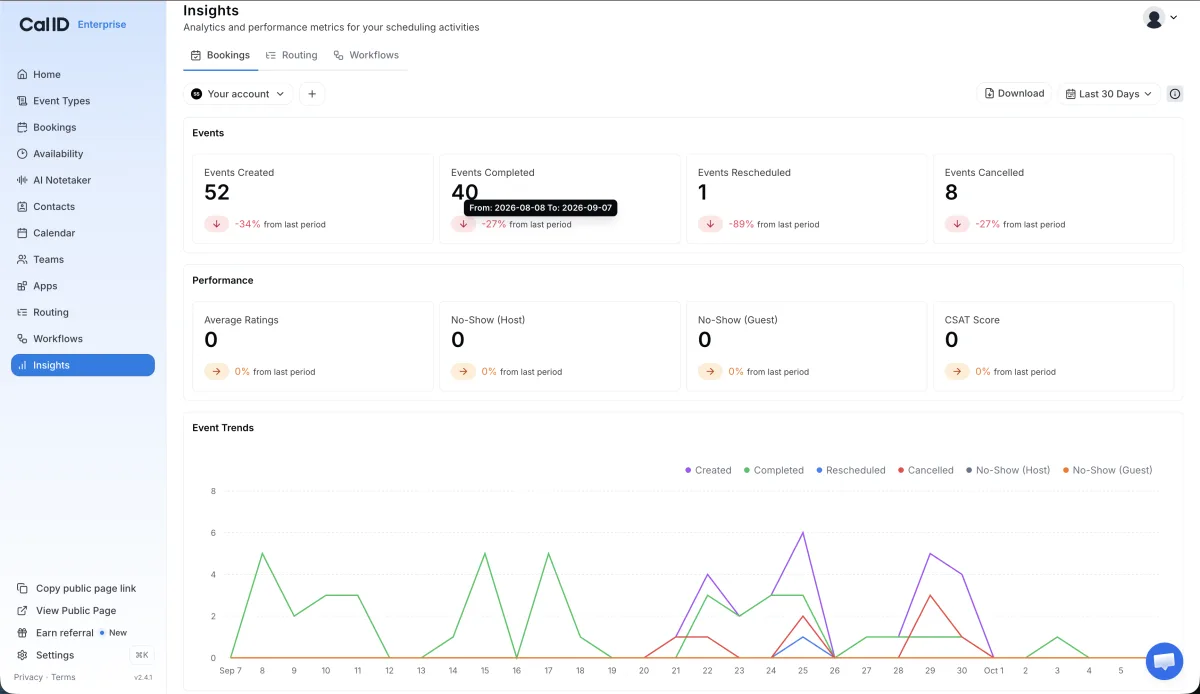
The reporting is lean, but it answers the one question that matters: how many bookings turn into meetings? Cancellations, reschedules and no-shows are listed separately, the curve shows the trend over the selected period, and the export goes out as a download. Anyone who wants more connects Zapier or Make and writes the data wherever it is needed.
Video: “How to Use Cal ID (Free Appointment Scheduling Software)” — official OneHash channel (the maker of Cal ID). Setup, calendar connection and the first event type in a few minutes.
Pricing: one person free, teams per user
The tiers turn on exactly one question: does a second person need their own booking page, or should requests be distributed across a team? As long as the answer is no, everything stays free — no credit card, no cap on bookings. The jump to Business pays off once you need round-robin, routing or unlimited reminders, and annual billing there halves the per-user price against paying monthly. What the cards cannot show: paid bookings run through the payment processor, whose fees remain; and the AI notetaker that transcribes meetings is a paid add-on, not part of any plan.
What we like about Cal ID and what we don't
Pros
- Free plan with no cap on bookings or event types
- Reminders by WhatsApp, SMS and email
- No commission on paid bookings
- Team features at a fraction of the Calendly price
- Imports your existing Calendly events
Cons
- Young product, small help ecosystem
- India-based, data location not published
- Razorpay as a payment route targets India
What remains is the question of maturity. The product is young, the version number in the interface is low, and the help ecosystem — guides, third-party integrations, community answers — does not have the depth Calendly has built over years. The company is based in India, a data processing agreement is published, a data location is not; if you collect client data, read the DPA and ask for the sub-processor list. Neither is a deal-breaker, but both are things to know before the whole team moves over.
More scheduling and collaboration tools are in our Calendar & Scheduling category.
Pricing
Startup
Free
free forever, one user
- Unlimited event types, bookings and availability schedules
- Your own booking link, calendar sync (Google, Outlook)
- Insights on bookings and no-shows
Business
$5
per user per month billed annually (monthly: $10) — 14-day free trial
- Team scheduling: collective, round-robin, centrally managed event types
- Routing forms, advanced workflows, unlimited reminders
- Custom branding on the booking page
Enterprise
On request
for organisations with compliance requirements
- Everything in Business
- SSO via SAML, audit logs
- Dedicated support
Prices may change — check the official website for current plans.
Alternatives by use case




Frequently Asked Questions
Is Cal ID really free forever?
Yes, for one person. The Startup plan needs no credit card and puts no cap on event types, bookings or availability schedules. The Business plan starts the moment a second person needs their own booking page or requests should be distributed across a team.
How much does Cal ID cost?
The tiers turn on a single question: one person or a team. Everything an individual needs is free. The Business plan is billed per user and halves per user on annual billing compared with paying monthly — the jump pays off once it is clear the team is staying. Enterprise is quote-based, and the figures sit in the pricing cards above.
Cal ID vs Calendly — what is the difference?
Calendly is the more mature platform with the larger ecosystem, but round-robin, routing and managed events require its Teams plan. Cal ID bundles exactly those features into its Business plan, which on annual billing costs less than a third of Calendly Teams, and adds WhatsApp reminders. Anyone switching can import existing Calendly events with a built-in tool.
Does Cal ID take a commission on paid bookings?
No, on any plan. Payments run through Stripe, Razorpay or PayPal, and only that processor's standard fees apply. For discovery calls or consulting hours that should be paid at booking, that is the decisive difference from schedulers that charge a transaction fee.
Where is Cal ID's data stored, and is it GDPR-ready?
Only partly answerable from the public pages. The company is based in India (OneHash Technologies, Bengaluru) and says so on its own GDPR page; transfers outside the EEA run on Standard Contractual Clauses by its own account. A data processing agreement is published; a data location is not. If you collect client data through the booking page, check the DPA before rolling it out and request the sub-processor list — that one is available only on request.
Verdict
For one person, Cal ID is a free booking link with no hidden ceilings, and that is what makes it so easy to start. It gets interesting for teams: round-robin, routing forms and WhatsApp reminders sit in one plan that, on annual billing, costs less than a third of Calendly Teams. What it lacks is maturity — the product is young, the help ecosystem thin, and you have to ask about data location yourself. If you can live with that, this is currently one of the cheapest serious options for team scheduling.