LinkedIn Prospecting for Freelancers: Find and Reach Your Ideal Clients (2026)
Fastlancer Team · Updated: Nov 23, 2026
Your offer is good, but work arrives in waves, and referrals alone do not fill the calendar. The clients you want are on LinkedIn. The catch: mass messages and copy-paste pitches get ignored or reported.
This guide walks through a calmer approach in four steps: find the right companies, open the conversation with a real reason, follow up once, and keep track of every contact. Each step comes with the tool that makes it easier, and what you can skip.
The process in four steps
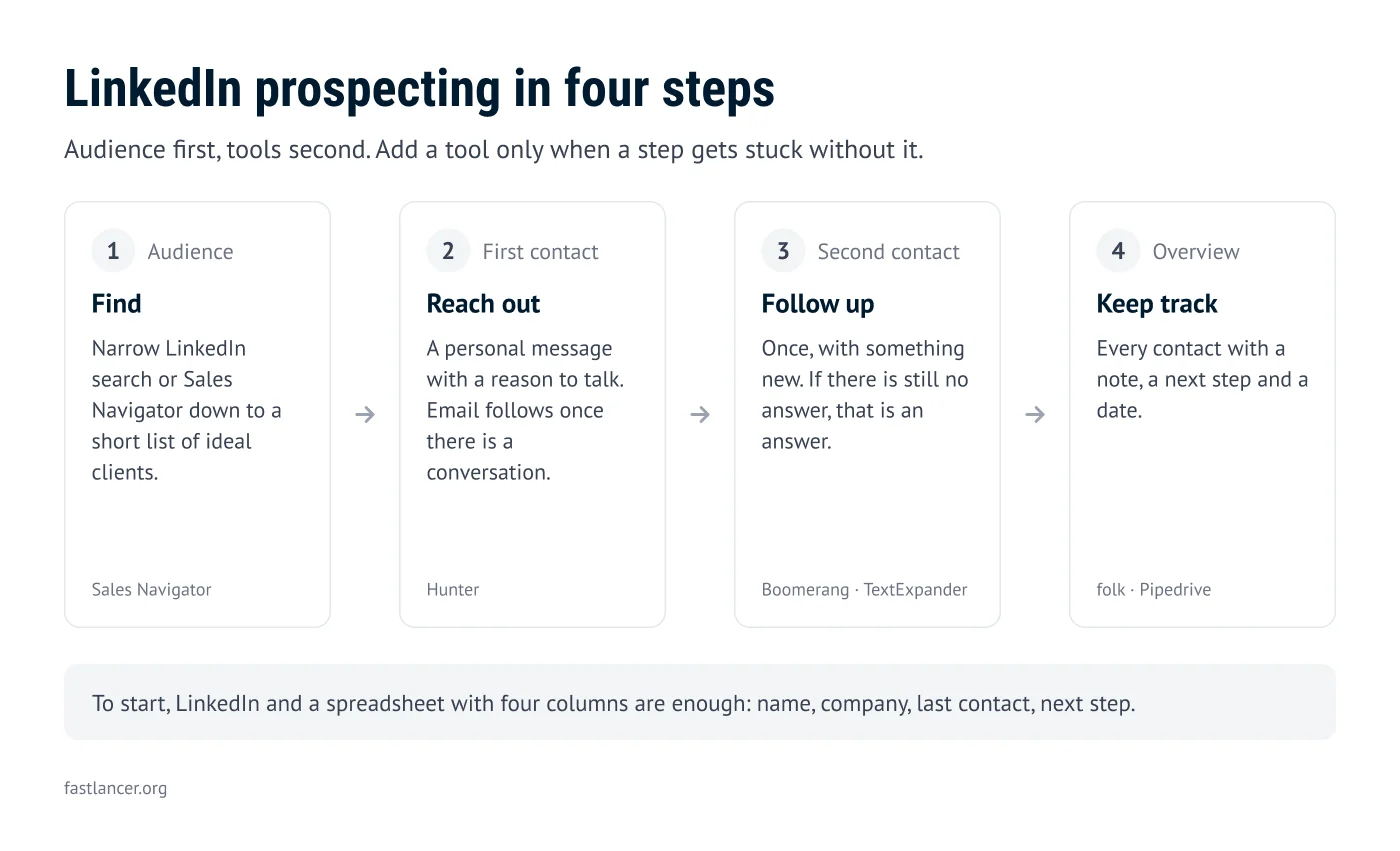
LinkedIn prospecting rarely fails because of the tool. It fails because of the order. Buy the tools first and decide who you want to reach later, and your messages go nowhere. So the audience comes first and the CRM comes last.
-
Regular LinkedIn search, or Sales Navigator if you filter by industry, size and region every week.
-
A personal message with a reason to talk. Hunter finds the right email address when you need it.
-
Once, with something new. Boomerang reminds you, TextExpander saves the typing.
-
Every contact in a CRM like folk or Pipedrive, so no conversation gets lost.
Step 1: Find your ideal clients
Before you search, write down in one sentence who you help: industry, company size, and the role of the person who decides on your offer. That sentence turns LinkedIn search into a short list instead of an endless one.
Free search is enough to start. It filters by location, company and title, and company pages lead you to the people behind them. Use it heavily, though, and you hit the monthly search limit LinkedIn sets for free accounts.
LinkedIn Sales Navigator is built for exactly this work: finer filters by company size, industry and growth, lists where you follow companies and people, and short AI summaries of the account and the person. For a freelancer, the entry plan Core is enough.
| Free search | Sales Navigator Core | |
|---|---|---|
| Search filters | Basics like location, company, title | More than 50, incl. company size and industry |
| Save leads | No | Lists for companies and people |
| Message people you are not connected to | No | 50 InMails a month |
| Search limit | Monthly cap for heavy use | Built for prospecting |
| Cost (US list price, November 2026) | $0 | $119.99 a month or $1,079.88 a year |
Is it worth it? Weigh it against what a single new project brings you. It still only makes sense if you open it every week during a focused outreach push. If you already know your two or three dream clients by name, you do not need it.
Step 2: Reach out without pitching
The first message is not an offer. It is a reason to talk: a post the person wrote, a new project at their company, a job ad that matches what you do. Two or three sentences that show you paid attention, plus a question that is easy to answer. Send the portfolio link when someone asks for it.
Email is the next step once there is a conversation, or a direct route if the rules allow it. Those rules depend on where your prospect sits. In the US, CAN-SPAM permits unsolicited business email as long as you identify yourself, include a postal address and honor opt-outs. In the UK, PECR allows it to corporate addresses if you offer an opt-out, while sole traders need consent first. In Germany, email advertising needs prior consent even between businesses.
When you need the address, Hunter finds it from a name and the company domain and checks whether it will deliver, so your message reaches the right person instead of info@. You can also send short sequences from Hunter itself, and the free plan covers occasional lookups.
Skip automation tools that send connection requests and messages in bulk. LinkedIn's user agreement prohibits bots and automated access, and getting flagged puts at risk the very account your clients are supposed to come through.
Step 3: Follow up without being annoying
Plenty of replies only come after a second message. Follow up once, with something new rather than "just checking in": a short tip, a relevant idea, an example. If there is still no answer, that is an answer.
So the follow-up does not get lost in a busy week, Boomerang reminds you in Gmail when an email gets no reply and sends messages at a time they will be read. If you write similar messages often, TextExpander turns a short abbreviation into a full paragraph, and you add the personal part. It saves typing, not thinking about the person on the other end.
Step 4: Keep track of every contact
Once several conversations run in parallel, no memory keeps up with who said what and when. A CRM does: every contact with notes, a next step and a date.
folk fits LinkedIn prospecting particularly well because it saves profiles as contacts in one click and fills in missing details. If you sell projects with clear stages, Pipedrive shows every open deal and its next step on one board. To start, a spreadsheet with four columns works too: name, company, last contact, next step. More options are in the guide to the best CRM for freelancers.
For other ways to win work, from referrals to platforms, see how to get clients as a freelancer.
Frequently Asked Questions
Do I need LinkedIn Sales Navigator to find clients?
No. With a clear target audience and a few dozen prospects, regular LinkedIn search is enough. Sales Navigator pays off when you search for new companies by size, industry or region every week and want to follow them in lists. Many freelancers use it for a month during a focused outreach push.
How much does LinkedIn Sales Navigator cost?
For a freelancer, the entry plan Core is the one to look at. Paying annually is clearly cheaper than paying month to month; current list prices are in the table in the section on finding clients. LinkedIn shows the binding price at checkout, and it varies by country. Advanced is built for sales teams.
Is it legal to cold email prospects I find on LinkedIn?
It depends on where they are. In the US, CAN-SPAM allows unsolicited business email if you identify yourself, include a postal address and honor opt-outs. In the UK, PECR allows it to corporate addresses with an opt-out, but sole traders need consent. In Germany, email advertising needs prior consent even between businesses. Check the rules for the recipient's country.
How do I find someone's work email address?
A tool like Hunter finds the work address from a name and the company domain and checks whether it will deliver. That keeps your message from landing in a generic info@ inbox.
How often should I follow up on LinkedIn or by email?
Once, with something new rather than asking whether your last message arrived. If there is still no answer, that is an answer. A reminder tool like Boomerang makes sure the one follow-up does not slip.