Clean Email Review 2026: Declutter Your Inbox and Unsubscribe in Bulk
Fastlancer Team · Updated: Nov 17, 2026
Short verdict
Clear out newsletters so client email stays on top
- Freelancers whose inbox has filled up over the years with newsletters, store receipts and app notifications
- Anyone who wants to clean Gmail, Outlook, iCloud or a work IMAP account in one place without switching email apps
- People who want promos and notifications filed away by rules instead of deleting them by hand every week
- Teams that need a shared inbox with permissions and central admin for employees
- Anyone looking for a new email app to read and write mail every day
What Clean Email does for you
An inbox fills up quietly: newsletters you don't remember signing up for, order receipts, notifications from every app you ever tried. Sooner or later a client inquiry slips below twenty promos. Clean Email connects to the mailbox you already have and sorts your mail into bundles instead of listing it one message at a time.
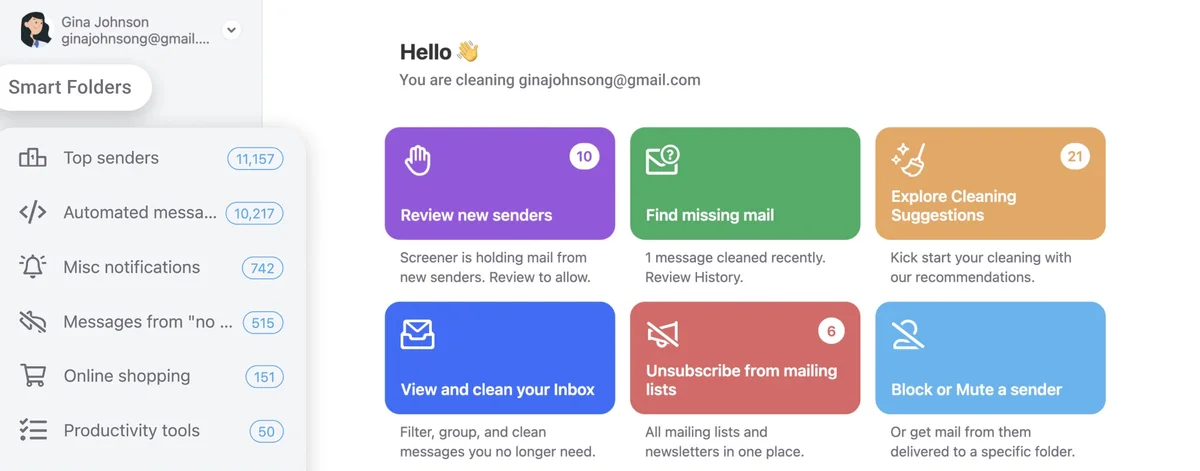
These Smart Folders group mail by sender, age, size or type, such as top senders, automated messages or online shopping. You trash, archive or move a whole bundle in one click. Changes happen on the mailbox itself, so Gmail, Outlook or Apple Mail shows the same cleaned-up inbox afterwards. Proton Mail, Tuta and shared mailboxes you only reach through delegated access can't be connected.
Unsubscribing and screening new senders
The Unsubscriber lists every mailing list that writes to you. Hit Unsubscribe and Clean Email tries every route: an opt-out email, the link in the message header, and the sender's unsubscribe form if needed. If a sender ignores the request, its future emails go straight to trash anyway. If you just need a break from a newsletter, you can pause it instead.
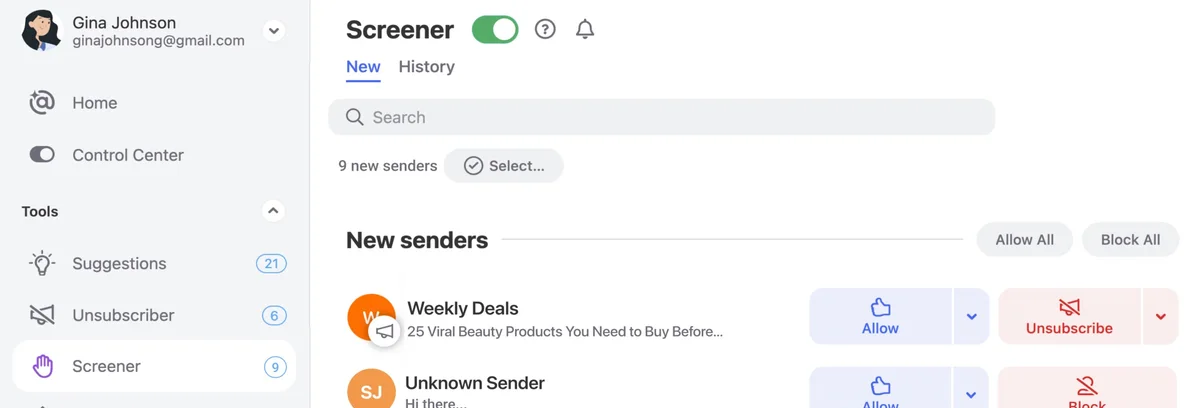
The Screener goes further and holds mail from unknown senders until you approve them. For freelancers that cuts both ways: a new client inquiry also comes from an unknown sender. If you turn the Screener on, glance through its list every day.
Rules that keep the inbox clean
To stop the clutter from coming back, you set rules. For single senders, sender settings are enough: block, mute, deliver straight to a folder, delete after a set time or keep only the newest message. For anything more specific there's Auto Clean, for example archiving order and shipping emails after a month or marking notifications as read on arrival.
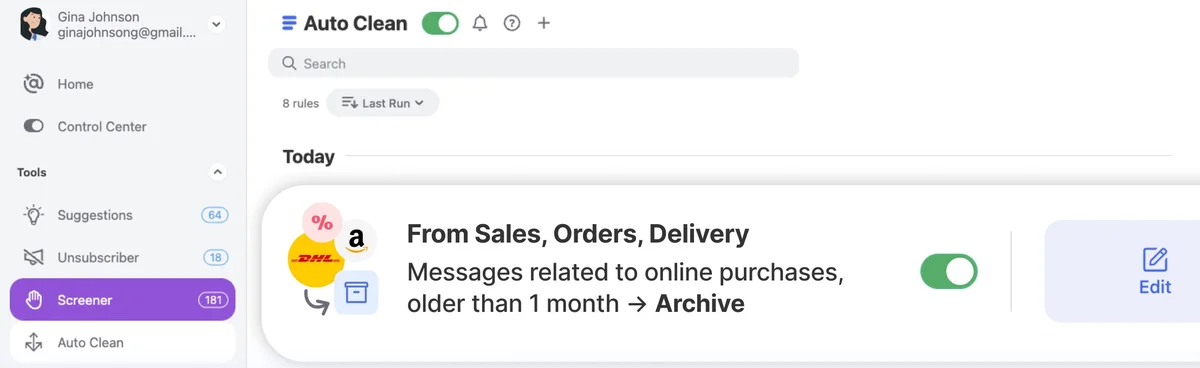
Rules run without asking. One that's too broad will also sweep away emails you need. Start narrow, with one sender or one bundle, and widen it only once the rule reliably hits the right messages.
Privacy: what Clean Email sees in your inbox
Free inbox cleaners have a history of paying for themselves with what's in your inbox, so this is the question to ask first. Clean Email's privacy policy says it reads metadata: sender, recipients, subject, date, folders and short preview excerpts. The full body is fetched when you open a message in the preview or when a feature needs it, for example a connected AI assistant. The company states it doesn't sell or rent personal or aggregated data and runs on subscription revenue alone.
Gmail and Outlook connect through OAuth, which you can revoke from your Google or Microsoft account at any time; iCloud uses an app-specific password. Without an active subscription, indexed data is deleted 45 days after your last login.
Clean Email pricing: you pay per inbox, not per feature
The tiers depend only on how many inboxes you connect; every plan has every feature. On annual billing, the five-account plan is already cheaper than two single accounts. The catch is billing: the one-account annual plan costs about the same as three months on monthly billing, but it generally isn't refunded; exceptions are narrow, for example if your email provider turns out not to be supported. Both plans renew automatically, and you need to cancel at least two business days before renewal. Run the 14-day trial first and only commit to a year once your inboxes connect without trouble.
What we like about Clean Email and what we don't
Pros
- Cleans thousands of emails per group
- Unsubscribe catches senders who ignore requests
- Works alongside any email app
- Gmail, Outlook, iCloud and IMAP
- Paid by subscriptions, not your data
Cons
- Subscriptions rarely refundable
- Free account cleans only 1,000 emails
- Not an email client for daily use
Clean Email isn't an email client; it's a tool for clearing out an inbox and keeping it that way. For freelancers with an overgrown inbox, it's one of the fastest fixes around. More options are in our email tools overview.
Pricing
1 account
$2.50 / month
- Every feature included
- Or $9.99 per month, cancel anytime
- Web, Mac, iPhone and Android at no extra cost
5 accounts
$4.17 / month
- Five inboxes, shareable with family or friends
- Or $19.99 per month, cancel anytime
- Every feature included
10 accounts
$8.33 / month
- Ten inboxes on one subscription
- Or $29.99 per month, cancel anytime
- Every feature included
Prices may change — check the official website for current plans.
Alternatives by use case
- SaneBox If you want mail sorted by importance without building rules yourself
- HEY If you'd switch to a new address with a built-in sender screener
- Superhuman If you want to fly through email daily and are happy to change apps
- Gmail If your mailbox's built-in filters and unsubscribe link are enough


Frequently Asked Questions
What does Clean Email do for a freelancer or small business?
Clean Email clears out an inbox where client emails get lost between newsletters, order confirmations and app notifications. It bundles similar messages into groups, so you delete, archive or move hundreds at once. You unsubscribe from mailing lists in one place, and rules keep the inbox clean afterwards. You keep your email app; Clean Email works directly on the mailbox.
How much does Clean Email cost?
Price depends only on how many inboxes you connect: one, five or ten. Every plan includes every feature. Paying yearly costs far less than paying monthly. Exact prices are in the plan cards, checked November 2026.
Is there a free version of Clean Email?
Yes, with limits. The free account cleans up to 1,000 emails in total and leaves out the Screener, sender settings and Auto Clean. Before that you can try everything for 14 days without a credit card, with unsubscribing capped at 25 newsletters during the trial. When the trial ends, the account drops back to free and nothing is charged.
Clean Email vs SaneBox: which one should I pick?
Clean Email shines at the big cleanup: bundles, bulk actions, unsubscribing in one place and rules you set yourself. SaneBox learns from your behavior and keeps sorting new mail by importance without you building rules. Pick Clean Email for a thorough purge followed by peace and quiet, SaneBox if you want a heavy daily inflow pre-sorted for you.
Is Clean Email safe? Does it read my emails or sell my data?
According to its privacy policy, Clean Email mainly works with metadata and short preview excerpts and only fetches content where a feature needs it. The company says it never sells or rents personal or aggregated data and is funded by subscriptions.
Verdict
Clean Email fixes a problem that builds up slowly: the inbox fills up until a client inquiry gets lost between promos and notifications. Its strengths are bulk actions on whole groups, unsubscribing in one place and rules that keep things tidy without changing email apps. The weak spot is the lack of team admin for anyone with employees sharing the workload. If you work solo or as a pair, run the 14-day trial and decide on a plan afterwards.