Keap Review 2026: All-in-One CRM and Marketing Automation Tested
Fastlancer Team · Updated: Sep 5, 2026
Affiliate link — we may earn a commission if you sign up, at no extra cost to you. How we test
Ideal for
- Solopreneurs and small teams who don't want CRM, email marketing and invoicing spread across three tools
- Coaches, consultants and service providers with recurring follow-up processes
- People who want to automate lead nurturing instead of chasing manually
- Businesses that want sales automation and invoicing in a single record
USP
One all-in-one platform that bundles CRM, marketing automation, pipelines, scheduling and invoicing — instead of wiring three separate subscriptions together
Free to start?
Yes — 14 days free, no credit card (trial capped at 25 emails)
What is Keap?
Keap (formerly Infusionsoft) is an all-in-one CRM with marketing automation built for solopreneurs and small businesses. Instead of subscribing to a CRM, an email tool, a scheduling app and an invoicing program separately and wiring them together, everything lives on one platform. The core is the combination of a contact database, a visual automation builder and a sales pipeline — Keap doesn't just store contacts, it takes over the follow-up work small teams otherwise do by hand.
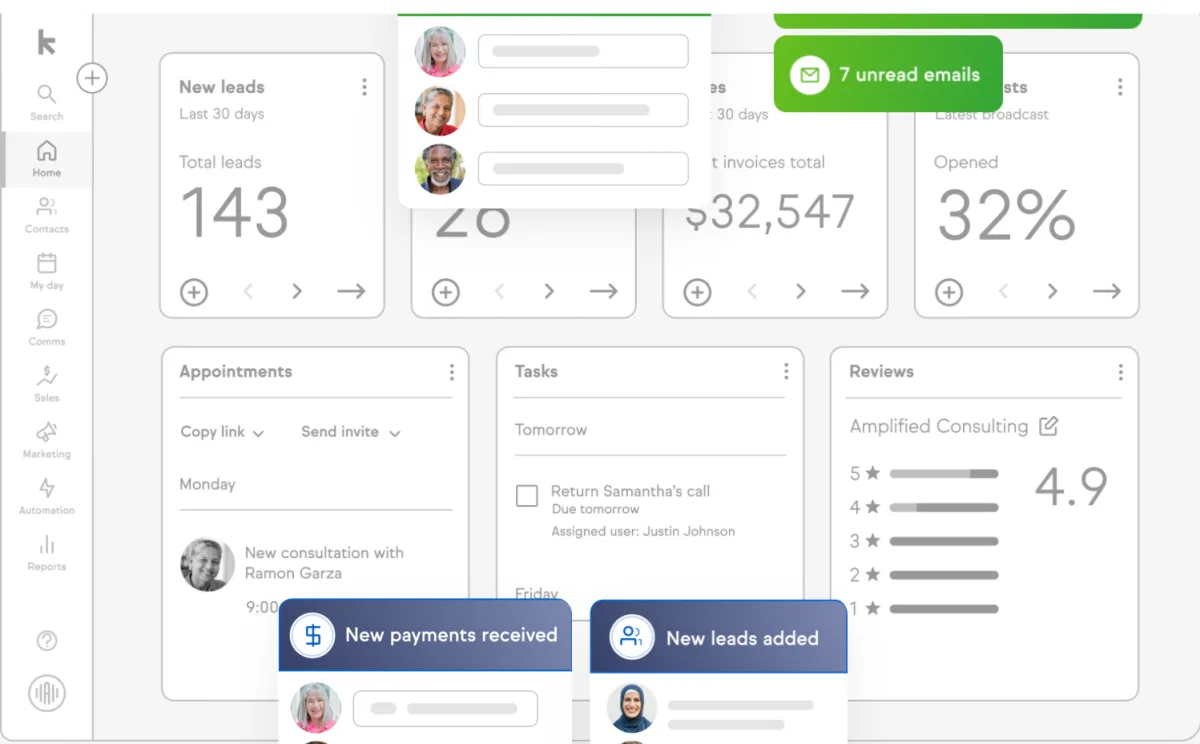
CRM and sales pipelines
Every contact gets a full history: emails, notes, appointments, purchases and automation steps all sit in one place. The pipeline visualizes deals across stages you drag and drop; each stage change can trigger an automation — a follow-up email, say, or a task for the team. For service businesses that want to turn inquiries into predictable work, this is the most practical part.
Marketing automation: the core
The visual automation builder is Keap's strongest argument. From triggers (a new lead, a tag, a form submission) and actions (send email, apply tag, create task, wait), you assemble complete follow-up sequences without writing a line of code. If you currently chase every first contact manually, this moves exactly that work into repeatable flows. SMS marketing can be added on — tier 1 is included, higher volumes cost $24–279/month extra — but only for US customers (1:1 texts also in Canada); UK accounts cannot book it.
Invoicing, scheduling and payments
Beyond marketing, Keap handles the business side too: appointments through a built-in booking page, quotes and invoices straight from the contact record, and payment processing through connected providers. For a small business this closes a common tool gap — the invoice and the follow-up hang off the same record, so nothing falls between apps. It's aimed at the US market, so heavy non-US tax handling still calls for a dedicated local tool.
Pricing and the honest math
Keap skips feature packs: there's one product whose price scales with your contact count. It starts at $299/month ($249 billed annually) for 1,500 contacts and 2 users, and climbs to around $719/month for 26,500 contacts. On top of that come $39/month per extra user and a one-time required onboarding fee (roughly $500–1,500). That's a high entry — the math works when Keap replaces two or three existing subscriptions and the automation saves real follow-up time. As a plain contact CRM it's too expensive.
Who is Keap for?
Keap makes sense for solopreneurs and small service businesses with recurring follow-up processes who deliberately want CRM, email automation and invoicing in one tool. If you only need somewhere to store contacts, you'll find something cheaper and simpler — more options live in our CRM and project-management overview.
What we like about Keap and what we don't
Pros & Cons
Pros
- All-in-one CRM, automation, pipelines, invoicing
- Visual no-code automation builder
- 14-day free trial, no card required
- Price includes 2 users, full platform
- Strong ratings for automation and support
Cons
- High entry price, around $299/month
- Price rises with your contact count
- One-time onboarding fee, $500–1,500
Pricing
Keap (Base)
$299
per month · $249/mo billed annually · 1,500 contacts, 2 users
- Full platform: CRM, automation, pipelines
- Email marketing and scheduling
- Invoices and payments
More contacts
up to $719
per month for 26,500 contacts — pricing scales with list size
- Same feature set, more contacts
- Fixed tiers up to 4 million contacts (51,500 = $779, 101,500 = $1,019)
- Extra users: $39/month each
Add-on costs
from $39
per extra user/month · SMS $24–279/mo (US only) · one-time required onboarding $500–1,500
- Extra user: $39/month
- SMS marketing: $24–279/month (US only)
- Required onboarding: $500–1,500 one-time
Prices may change — check the official website for current plans.
Frequently Asked Questions
How much does Keap cost?
Keap uses a single, scaling price rather than feature tiers. It starts at $299/month for 1,500 contacts and 2 users, dropping to $249/month when billed annually. The price rises with your contact count — up to around $719/month for 26,500 contacts. Additional users cost $39/month, plus a one-time required onboarding fee (roughly $500–1,500). As of September 2026 — check current pricing at keap.com.
Is there a free version of Keap?
No, there's no permanent free plan. Keap offers a 14-day free trial with no credit card required. It's functionally limited (max 25 emails, no payment processing), but it's enough to try out the CRM, automation builder and pipelines.
Who is Keap best for?
Solopreneurs, coaches and small service businesses that don't want CRM, email marketing, pipelines and invoicing spread across several tools. The biggest lever is automation: if you regularly chase leads and want follow-ups to run themselves, the time saved earns the price back. For a plain contact CRM with no automation needs, Keap is overkill.
Keap vs HubSpot — which is better?
Both are all-in-one CRMs but come at it differently. HubSpot has a free entry point and a huge ecosystem, but gets expensive once contacts and Hubs grow. Keap costs more upfront but packs sales automation, pipelines and invoicing into one price from day one. Rule of thumb: HubSpot for scaling marketing teams, Keap for solopreneurs and small service providers who want to automate follow-ups and send invoices from the same tool.
Does Keap integrate with other tools?
Yes. Keap connects to payment processors for invoicing and offers native integrations plus Zapier for thousands more apps — email, scheduling, forms and e-commerce. Its API also lets developers build custom connections. For most solopreneurs the built-in CRM, automation and invoicing already cover the core, so integrations mostly extend the edges rather than fill gaps.
Verdict
Keap is one of the few platforms that genuinely bundles CRM, email automation, pipelines and invoicing into a single tool — if you're currently wiring three subscriptions together, you trade that friction for automated follow-ups. The price is the trade-off: a roughly $299/month entry, costs that climb with your contact count, and a one-time required onboarding fee make Keap an investment, not an impulse buy. For solopreneurs and small service businesses with clear follow-up processes it's money well spent; if you only need a lightweight contact CRM, use the 14 days to test before you commit.
Affiliate link — we may earn a commission if you sign up, at no extra cost to you.